Summary
Editor's rating
Is it good value compared to other smart bulbs?
Design: basic look, but fits most lamps
Build quality, heat and how reliable it feels
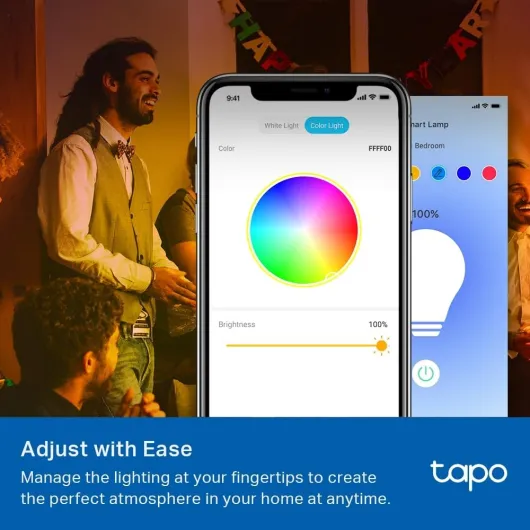
Brightness, colours and app control: how it actually behaves
What you actually get with the Tapo L530EA
Smart features: schedules, away mode and voice control in real life
Pros
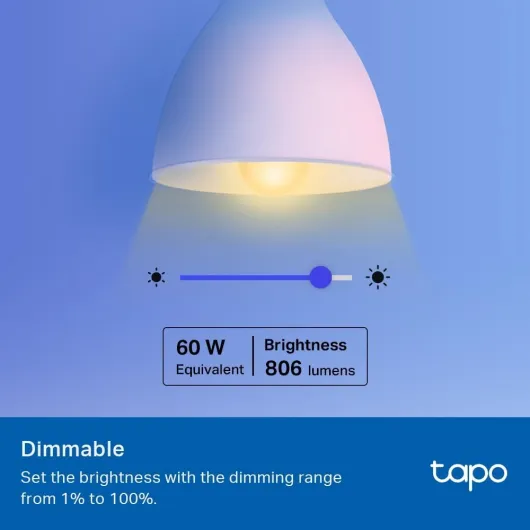
- Bright for an 8.3W bulb (806 lumens) with smooth dimming from 1% to 100%
- Works with Alexa and Google Assistant without needing a separate hub
- Good set of smart features: schedules, timers, away mode, presets, sunrise/sunset
Cons
- Initial setup requires using the Tapo app first, which can confuse less techy users
- Colour accuracy and richness are decent but behind more expensive brands
- Relies on 2.4 GHz Wi‑Fi, so performance depends heavily on your router and signal

Specifications
View full product page →| Brand | Tapo |
A cheap way to make your lights actually smart
I’ve been using the Tapo L530EA E27 smart bulb for a few weeks now, mainly in a bedside lamp and sometimes in the living room, just to see how it behaves day-to-day. I’m not an installer or anything, just a regular user with a couple of Alexa devices and some random smart plugs at home. I bought it because I wanted a simple Wi-Fi bulb that didn’t need a hub and could do colours without costing a fortune.
The first thing to say is: it does what it says on the box. It connects to Wi‑Fi, works with Alexa and Google Assistant, and you can change colour and brightness from your phone. No bridge, no extra box, just the bulb and the Tapo app. For the price, that’s already pretty solid. It’s not perfect, but it’s not some gimmick either.
In daily use, the thing I noticed most is how bright it is for an 8.3W bulb. It’s rated as a 60W equivalent at 806 lumens, and it actually feels like that in a normal bedroom or office. When you dim it down to 10–20%, it becomes more of an ambient light, which is nice in the evening. The colour modes are fun, even if you’ll probably settle on two or three favourites and forget the rest.
If you’re expecting a super high-end smart lighting ecosystem with ultra-precise colours and crazy automation, this isn’t that. But if you just want a decent Wi‑Fi bulb that’s easy to control, bright enough, and cheap enough to buy a few of them over time, it gets the job done. The real question is whether the setup and app quirks are worth the savings compared to pricier brands, and I’ll get into that in the next sections.
Is it good value compared to other smart bulbs?
In terms of value, this bulb sits in a nice middle ground. It’s usually cheaper than big-name brands like Philips Hue (especially since it doesn’t need a hub), and often shows up in bundle deals with Alexa devices, which is how a lot of people seem to buy it. For the price of one Hue colour bulb plus a hub, you can often grab a couple of Tapo bulbs and be done. If you’re just trying to smarten up a few rooms without building a full-blown lighting system, that makes more sense.
What you’re paying for here is: decent brightness, full colour plus tunable white, Wi‑Fi connectivity with no extra box, and an app that’s usable without being a mess. You also get schedules, timers, away mode, and voice control with Alexa/Google. None of those features are unique, but having them all in a budget-friendly bulb is where the value shows. You’re not getting top-tier colour accuracy or advanced automation like some higher-end ecosystems offer, but for everyday use, it’s enough.
On the downside, the energy label is F, which looks bad on paper, but that’s mostly due to new EU rating rules. In practice, 8.3W for a 60W equivalent is still efficient compared to old bulbs. If you’re extremely picky about energy ratings, you might raise an eyebrow, but in real bills, it’s still cheap to run. The only real cost question is how many of these you plan to buy. For one or two bulbs, the price is easy to justify. If you want to kit out an entire large house, you might start bumping into the limitations of Wi‑Fi bulbs and consider a more robust system.
Overall, I’d say it offers good value for money as long as you know what you’re getting: a budget-friendly smart bulb that covers the main features without the premium polish of more expensive brands. If you already use the Tapo ecosystem (plugs, cameras, etc.), it makes even more sense, since you can manage everything in one app. If you’re starting from scratch and just want to try smart lighting without spending a lot, this is a sensible entry point.

Design: basic look, but fits most lamps
Design-wise, the Tapo L530EA is as exciting as… a bulb. It’s a standard E27 screw base with a white plastic body and a diffused top. Size-wise, it’s around 11.5 cm high and 6 cm wide. That means it fits in pretty much any normal lamp or ceiling fitting I tried, but it’s a bit taller than some cheap non-smart bulbs. In an open lamp, it looks totally normal. In a very tight shade or enclosed fixture, you might want to check the space first, but I didn’t run into any real issues.
The finish is matte plastic with the Tapo branding printed on it. Nothing fancy, but nothing ugly either. Once it’s in a lamp, you don’t really look at it anyway. It’s not one of those weird oversized smart bulbs that stick out of the shade. The weight is light (around 60g), so it doesn’t drag down flexible lamp arms or wobble the fixture like some heavier bulbs can.
From a usability angle, the design choice that matters most is the beam angle: 220 degrees. In a table lamp or ceiling lamp, that gives a nice, even spread. It doesn’t create a narrow spotlight; it feels like a normal household bulb. That’s important if you’re replacing a basic 60W bulb and expect similar coverage. There’s no visible hotspot or weird colour ring when using white light. Colours are a bit less even, but still fine for everyday use.
One small thing: there’s no physical button or extra control on the bulb itself. Everything is done via the wall switch and the app/voice. If you cut the power at the switch, the bulb obviously goes offline and can’t be controlled until you flip it back on. That’s normal for Wi‑Fi bulbs, but if you live with people who love turning things fully off at the wall, be ready for some arguments. Overall, the design is plain but practical, and it behaves like a regular bulb once installed, which is what I wanted.
Build quality, heat and how reliable it feels
Durability is hard to judge in a few weeks, but there are a few signs. The bulb is rated for 25,000 hours, which is pretty standard for this type of LED smart bulb. If you run it about 3 hours a day, that’s theoretically many years of use. Obviously I haven’t hit that number, but in continuous evening use (several hours per night) it stayed stable: no flicker, no weird buzzing, and no random reboots.
Heat-wise, the bulb gets warm but not dangerously hot. After running at 100% brightness for a couple of hours, I could still touch it without burning my fingers, though you can feel the heat near the base. That’s normal for an LED with built-in electronics. I wouldn’t stick it in a tiny, fully enclosed fixture with zero airflow for long periods, but in normal lamps and ceiling fittings, it’s fine. The plastic housing helps with heat management and also avoids the “scalding hot glass” issue you get with old incandescent bulbs.
On the reliability side, the Wi‑Fi connection was mostly stable. Across the test period, I had one or two brief disconnects where the app showed the bulb as offline for a minute, then it came back without me doing anything. That’s acceptable, but if you rely heavily on automations, it might annoy you if your Wi‑Fi is weak. The good news is that even if the bulb drops off the network, you can still use the wall switch like a normal light, so you’re never completely stuck in the dark.
Physically, the E27 screw base feels solid when you install it; it doesn’t wobble or feel loose in the socket. The plastic shell doesn’t creak or feel flimsy when you handle it. Compared to cheaper generic smart bulbs I’ve tried off random marketplaces, this one feels a bit more trustworthy. Of course, long-term reliability will depend on how often you switch it, the heat in your fittings, and your power stability, but nothing in my use so far suggests it’s fragile or poorly built.
Brightness, colours and app control: how it actually behaves
On performance, the bulb is pretty solid for the price. The white brightness (806 lumens) is enough for a small living room, bedroom, or office. In my bedroom lamp, 100% brightness felt like a normal 60W bulb. I usually kept it around 40–60% for everyday use, and 5–15% in the evening. The dimming is smooth in the app, and you can go from 1% to 100% without jumps. At the very lowest level, it’s still usable as a night light, not totally off like some cheaper bulbs that cut out below 10%.
Colour performance is decent but not mind-blowing. You get a wide range of colours, but some shades are a bit washed out compared to higher-end brands. Reds and blues look good, greens are okay, and pastel tones can look a bit off. For mood lighting, parties, or just messing around, it’s totally fine. If you’re trying to match very specific colours for photography or something serious, this isn’t the right product. White temperature adjustment (from warm to cooler white) is the part I used the most, and that works very well: warm for evenings, cooler for work or reading.
In terms of responsiveness, once it’s set up, the bulb reacts quickly to commands from the Tapo app or Alexa. From my phone, turning it on or off usually took about a second. Voice commands via Alexa were similar: say “Alexa, turn off bedroom light” and it reacts almost immediately, as long as your Wi‑Fi isn’t acting up. I didn’t notice major lag unless my internet connection was already struggling. The “restore last light state” feature is also handy: after a quick power cut, it came back to the previous brightness and colour, which is what you want at 2am.
One thing to be aware of: because it’s Wi‑Fi based (2.4 GHz only), if your router is overloaded or far away, you might get occasional disconnects. I had one evening where the bulb dropped out of the app and reappeared a minute later. Not a huge deal, but if your Wi‑Fi is very weak in the room, expect a bit of flakiness. Compared to some Zigbee bulbs I’ve used, Wi‑Fi isn’t as stable for big setups, but for one or two bulbs in a flat, it’s good enough.
What you actually get with the Tapo L530EA
This is a single E27 Wi‑Fi smart bulb: 8.3W LED, roughly 60W equivalent, 806 lumens, colour-changing, and dimmable. No hub needed, it just connects to your 2.4 GHz Wi‑Fi and you control it via the Tapo app, or by voice with Alexa or Google Assistant. On paper it does quite a lot for a fairly low price: 16 million colours, schedules, timers, sunrise/sunset mode, away mode, presets, and the option to restore the last light state after a power cut.
In practice, the features I actually used are much simpler: on/off from the app, dimming, switching between warm white and cool white, and occasionally throwing in a colour like red or blue when I was bored. The “away mode” is basically a random on/off pattern to make it look like someone’s home. I tested it for a few evenings while I was out, and it does turn the light on and off in a semi-random way. It’s not sophisticated, but it’s better than leaving the light on all night.
The presets and scenes are handy if you’re willing to spend 5–10 minutes playing with the app at the start. You can save combinations like “movie night” (very dim warm white), “work” (bright cool white), or “night light” (low brightness orange-ish). After that, it’s one tap to switch between them. If you’re lazy like me, you’ll probably create two and ignore the rest, but the option is there. The bulb also supports sunrise/sunset based on your time zone, which I used to have the bedroom light gently come on in the morning instead of blasting full brightness at 7am.
Overall, the presentation is pretty straightforward: it’s a Wi‑Fi smart bulb with most of the basic smart features people actually use. There’s no crazy ecosystem lock-in, and it plays nicely with Alexa and Google, as long as you remember that you must set it up in the Tapo app first. If you just want a bulb you can yell at with Alexa and occasionally change the colour of, this covers the basics without trying to be overly fancy.
Smart features: schedules, away mode and voice control in real life
The smart side is where this bulb earns its keep. The Tapo app is fairly clear, and after a short learning curve, the features are actually useful. I set up a few schedules: one to turn the bedroom light on at 7:00 on weekdays at 40% warm white, and another to turn it off at 23:30. It worked consistently during the weeks I tested it. The sunrise/sunset feature is also nice if you don’t care about exact times and just want it to follow daylight changes.
Voice control through Alexa is the bit that changes how you use the light. Being able to say “Alexa, dim bedroom light to 20%” when you’re already in bed is just convenient. I also liked using voice to switch from white to colour, for example “Alexa, set bedroom light to red” when I didn’t want a harsh white light. The integration is smooth once everything is linked correctly. Important detail: you must add the bulb in the Tapo app first, then link the Tapo skill in Alexa. If you skip that step, Alexa won’t find it. A few reviewers mentioned this, and they’re right.
“Away mode” is a bit basic but does its job. I turned it on for a weekend away; the light turned on and off at random intervals in the evening. You don’t have fine control over the pattern, but from outside the house, it looked like someone was home flicking the switch occasionally. Combined with schedules, you can create something that looks fairly natural without thinking about it too much. It’s not real security, but it’s better than a permanently dark house.
Presets and scenes are the last piece. Once you’ve saved a few favourites (for example: “Reading” at bright cool white, “Chill” at dim warm white, “Party” in a colour), jumping between them is quick. You can also group the bulb with other Tapo devices or other smart bulbs in Alexa. I tested grouping it with another brand’s smart bulb in Alexa, and it still worked fine as a “room” command. Overall, in terms of effectiveness as a smart bulb, it covers the basics well and doesn’t feel like a toy.
Pros
- Bright for an 8.3W bulb (806 lumens) with smooth dimming from 1% to 100%
- Works with Alexa and Google Assistant without needing a separate hub
- Good set of smart features: schedules, timers, away mode, presets, sunrise/sunset
Cons
- Initial setup requires using the Tapo app first, which can confuse less techy users
- Colour accuracy and richness are decent but behind more expensive brands
- Relies on 2.4 GHz Wi‑Fi, so performance depends heavily on your router and signal
Conclusion
Editor's rating
The Tapo L530EA is a straightforward Wi‑Fi smart bulb that does the basics well: it’s bright enough, offers full colour and tunable white, and works with Alexa and Google without needing a separate hub. Setup can be a bit confusing if you skip the Tapo app step, but once it’s in place, daily use is simple: voice commands, app control, schedules, and a few handy extras like away mode and sunrise/sunset. It doesn’t try to be fancy; it just behaves like a normal bulb that happens to be controllable from your phone.
It’s not flawless: colours are good but not on the level of higher-end systems, the energy rating looks worse on paper under the new labels, and Wi‑Fi can be less stable than Zigbee if your network is weak. But for the price, especially if you grab it in a bundle deal, it offers solid value. It suits people who want to smarten up a bedroom, office, or small flat without investing in a hub or a whole ecosystem. If you’re building a massive, highly automated smart home or you’re obsessed with perfect colour reproduction, you’ll probably want something more advanced. For everyone else, it’s a practical, budget-friendly smart bulb that gets the job done without too much fuss.
![NEW White and Colour Ambiance Smart Light Bulb Starter Kit, 75W - 1100 Lumen [E27 Edison Screw] 2 Bulbs + Smart Button - With Bluetooth - Works with Alexa, Google Assistant and Apple Homekit E27 2 Pack Starter Kit + Button](https://www.smart-light-guru.com/storage/1015385/conversions/71yJIPbE0LL._AC_SL1500_-medium.webp)

![L510E Smart Bulb, Smart WiFi LED Light, E27, Works with Amazon Alexa(Echo and Echo Dot), Google Home, Dimmable Soft Warm White, No Hub Required [Energy Class F] 1 Pack](https://www.smart-light-guru.com/storage/939180/conversions/71WGq8rBN-L._AC_SL1500_-medium.webp)