Summary
Editor's rating
Is it worth the money compared to other smart bulbs?
Bulky but normal looking – nothing fancy, but it fits
Build, heat, and how confident I feel about it lasting
Brightness, colours, and how fast it reacts
What this bulb actually does (beyond just turning on)
Smart features that actually help (and a couple that are just “nice to have”)
Pros
- Bright enough (806 lumens) with good dimming and adjustable white light
- No hub required – connects directly to 2.4 GHz Wi‑Fi and works with Alexa/Google
- Good price for a full RGB smart bulb with schedules, timers, and away mode
Cons
- Setup process can confuse less tech‑savvy users (Tapo app first, then Alexa/Google)
- Coloured modes are dimmer than white light, like most budget RGB bulbs

Specifications
View full product page →| Brand | Tapo |
A cheap way to test smart lighting without redoing your whole house
I’ve been using this Tapo L530BA B22 smart bulb for a couple of weeks in a basic ceiling fitting, mainly with Alexa and the Tapo app. I didn’t change anything else in the room: same lampshade, same switch, just swapped the old bulb for this one. I wanted to see if a single budget smart bulb could actually be useful day‑to‑day, or if it would end up as one of those gadgets you stop using after a week.
In practice, it’s a pretty straightforward product: screw it into a B22 socket, connect it to Wi‑Fi via the Tapo app, link it with Alexa or Google, and that’s it. No extra hub, no bridge, no weird proprietary box. I’ve tested Philips Hue and IKEA bulbs before, so I had a decent comparison in mind, especially on brightness, app stability, and delay when turning on and off.
My use case is simple: one bulb in the living room for normal white light in the evening and some coloured light for TV time. I also played with schedules, away mode, and voice control to see if the features are actually useful or just marketing. I also tried it remotely over 4G to check how reliable the connection is.
Overall, it’s not perfect, but it gets most things right for the price. The light is strong enough, colours are fun, the app is okay, and voice control works fine once everything is linked properly. There are a couple of small annoyances, especially around setup and how your wall switch basically becomes a “do not touch” button, but nothing deal‑breaking for a first smart bulb.
Is it worth the money compared to other smart bulbs?
On value for money, this Tapo bulb sits in a sweet spot. It’s usually cheaper than Philips Hue and sometimes cheaper than IKEA’s smart bulbs, especially when it’s on sale or in a bundle with an Alexa device (as some Amazon reviewers mentioned). For the price of a single Hue bulb plus hub, you can often get a couple of these Tapo bulbs and be done, since they connect straight to Wi‑Fi with no extra hardware.
What you get for the price:
- Full RGB colour + adjustable white
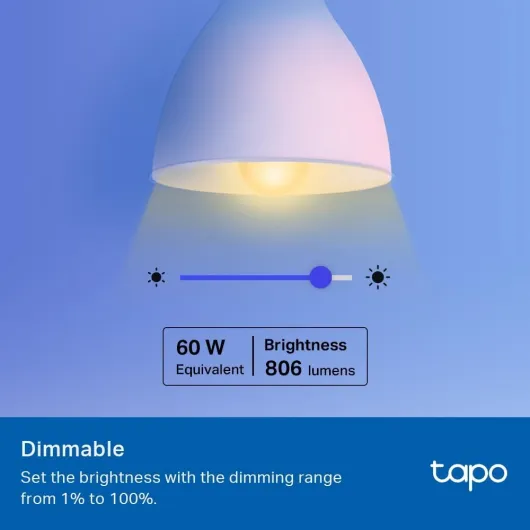
- Decent brightness (806 lumens)
- App control, voice control, timers, schedules, away mode
- No need for a separate hub or bridge
On the downside, setup can be slightly annoying if you’re not used to connecting devices to Wi‑Fi. A few reviewers mentioned that an adult struggled and a teenager had to do it, which I can believe. You have to install the Tapo app, add the bulb there first, connect it to your Wi‑Fi, and only then link it with Alexa or Google. Once you know the order, it’s fine, but it’s not completely idiot‑proof. Also, if you plan to fill a whole house with these, Wi‑Fi congestion might become a thing; that’s where a hub‑based system like Hue still wins.
For one to a handful of bulbs, though, I’d say the value is good. It’s bright, flexible, and brings all the main smart features at a lower price than the big names. If you grab it on a discount or as part of a bundle, it’s even better. There are cheaper no‑name bulbs out there, but Tapo/TP‑Link at least has a proper app and ongoing support, which matters for something you expect to use for years.

Bulky but normal looking – nothing fancy, but it fits
Design‑wise, the Tapo L530BA looks like a standard white LED bulb, just slightly bulkier than some older non‑smart LEDs. It uses the common A21 shape with a B22 bayonet base, and measures roughly 11.5 cm in height and 6 cm wide. That’s important if you have small or tight lampshades. In my case, it fit into a basic ceiling fitting and a simple bedside lamp without any issue, but in a very narrow decorative shade, it might look a bit cramped.
The finish is plain white plastic with a matte diffuser. No metal accents, no transparent sections, nothing that screams “tech gadget”. Once it’s in the lamp and the light is on, you don’t really see the bulb anyway, so I don’t care much about looks here. It doesn’t feel premium, but it doesn’t feel cheap and hollow either. For the price, the build is decent and doesn’t rattle or feel fragile when you twist it in.
One thing to note: because it’s a smart bulb, the housing is slightly larger than a basic LED. If you’re replacing a very slim bulb under a tight glass dome, measure first. Also, the beam angle is listed at 220°, which matches my experience: the light spreads nicely in the room and doesn’t feel like a narrow spotlight. In my living room, one bulb gave even light across a medium‑sized room with a white ceiling.
In short, the design is nothing special but effective. It looks like a normal bulb, feels sturdy enough during installation, and once it’s in place, you forget about it. If you’re looking for some designer‑looking smart bulb, this isn’t it. If you just want a functional bulb that fits most standard fixtures, it does the job.
Build, heat, and how confident I feel about it lasting
The bulb is rated for 25,000 hours of life, which is standard for this type of LED. Obviously I haven’t run it that long, but after a couple of weeks of daily use (on for 4–6 hours a day), I didn’t notice any flicker, weird noises, or random resets. The base and housing stayed solid when removing and re‑installing it a few times, with no looseness or cracking sounds.
In terms of heat, after being on at 100% for a few hours, it gets warm but not burning hot. You can still touch it without frying your fingers, which is normal for an LED with built‑in electronics. Heat is usually what kills LEDs early, so the fact that it doesn’t roast itself is a good sign. I used it in a closed ceiling shade and it was fine, though I wouldn’t cram it into a tiny sealed box if you want to maximise lifespan.
The bulb is rated for indoor use only, so no bathrooms with heavy condensation or outdoor fixtures without protection. The plastic construction and electronics don’t look like they’d enjoy damp conditions. Also, keep in mind that if your Wi‑Fi router is unstable and keeps dropping, you might think the bulb is faulty, but in reality it’s just losing network. During my test, on a stable 2.4 GHz network, it stayed connected without me having to reset it.
Overall, I’d say the durability feels decent for the price. It doesn’t scream “premium”, but nothing about it feels flimsy. If it really holds close to that 25,000‑hour rating, you’ll probably replace it for tech reasons (moving to a different system) before it actually dies. The weak point, as usual with smart bulbs, is more the network and ecosystem than the physical bulb itself.
Brightness, colours, and how fast it reacts
On performance, the bulb is strong for an 8.3W LED. The 806 lumens spec seems realistic. In my living room, one bulb in a ceiling fixture was enough for normal evening use. At 100% brightness on cold white (around 6500K), the room is properly lit, not dim at all. For reading on the sofa, I usually dropped it to around 70%. Compared to a cheap supermarket LED I had before, this one is a bit brighter and more even.
The colour temperature range is useful. Warm white is comfortable for evenings and looks close enough to a normal warm bulb. Cold white is more clinical but handy for cleaning or working. The RGB colours are fun but, like most smart bulbs at this price, the colours are not as bright as white. Reds, greens, and blues look good in a dimmed room, but if you expect the same brightness as plain white, you’ll be a bit disappointed. This is normal; almost all RGB bulbs behave like this.
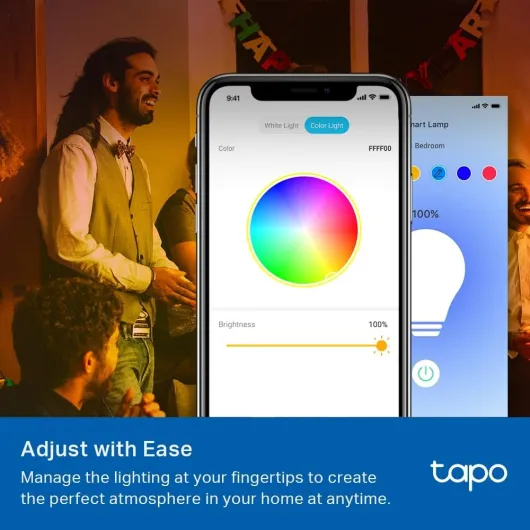
On responsiveness, the bulb reacts pretty fast over Wi‑Fi. From the Tapo app, on/off and dimming changes happen in about a second. With Alexa, commands like “turn off the light” or “set light to 20%” are also quick, maybe a small delay but nothing annoying. I didn’t notice random disconnects, but you do need a stable 2.4 GHz Wi‑Fi. If your router is far away or your Wi‑Fi is poor, expect some hiccups.
In everyday use, I mainly used these actions:
- On/off via Alexa when entering or leaving the room
- Dimming to 20–30% for TV time
- Switching to warm white in the evenings, colder white in the morning
- Occasional solid colour (red/blue) just for mood lighting
What this bulb actually does (beyond just turning on)
On paper, the Tapo L530BA is a Wi‑Fi smart LED bulb with a B22 bayonet base, 8.3W power draw (roughly a 60W incandescent equivalent) and up to 806 lumens of brightness. It does full RGB colour, adjustable white (from warm to cold) and is dimmable from 1% to 100%. It connects directly to your 2.4 GHz Wi‑Fi network, no hub needed. You control it through the Tapo app, Alexa, or Google Assistant. That’s the theory.
In real life, the main features I actually used were: on/off from the app, brightness control, changing between warm white and cold white, some colour scenes, and Alexa voice commands like “Alexa, turn on the living room light” or “Alexa, dim the living room light to 30%”. I also tested schedules (turn on at sunset, turn off at midnight) and away mode, which randomly turns the light on and off when you’re not home.
The bulb also has a “restore last light state” function. If you turn it off at the wall and then back on, it goes back to whatever brightness/colour it had before. That’s handy if someone in the house still uses the wall switch instead of the app or Alexa. The light comes back the way you left it, instead of blasting full cold white at 100%.
Compared to pricier systems like Philips Hue, you lose some advanced stuff (no fancy ecosystem, no separate hub with zigbee reliability), but you gain simplicity: one bulb, one app, done. For a first step into smart lighting, I’d say this is pretty solid. It does what most people actually want: remote control, dimming, colour options, and basic automation without needing extra hardware.
Smart features that actually help (and a couple that are just “nice to have”)
For me, a smart bulb is “effective” if it genuinely changes how I use the light, not just adds gimmicks. On that front, the remote control and voice control are the features I used the most and they work well. Walking into a dark room with your hands full and just saying “Alexa, turn on the light” is genuinely practical. Same for turning everything off from bed without getting up. That’s the stuff you keep using every day.
The scheduling and timer features are also useful, especially if you have a fixed routine. I set mine to turn on automatically around sunset and turn off at midnight. It synced correctly with my time zone and worked reliably for the two weeks I tested. The sunrise/sunset mode is handy if you don’t want to constantly adjust the time through the year. Set once, and it adapts to the season.
Away mode is more of a security gimmick but it does work as advertised: the bulb turns on and off at random times to make it look like someone is home. If you only have one smart bulb, it’s a bit limited (one random light in one room), but if you add more Tapo bulbs or plugs, it could start to look more realistic. Still, for travel, it’s better than nothing and easy to enable from the app.
The presets are a small but nice touch. Once you find a light setting you like (for example, warm white at 30% for watching TV), you can save it and recall it later from the app. That saves some tapping around. It’s not life‑changing, but in practice I used it a few times instead of manually sliding brightness/colour back and forth. Overall, the bulb is effective at doing the basics: remote control, dimming, and automation. The extra modes are more “bonus” than essential, but they’re there if you want them.
Pros
- Bright enough (806 lumens) with good dimming and adjustable white light
- No hub required – connects directly to 2.4 GHz Wi‑Fi and works with Alexa/Google
- Good price for a full RGB smart bulb with schedules, timers, and away mode
Cons
- Setup process can confuse less tech‑savvy users (Tapo app first, then Alexa/Google)
- Coloured modes are dimmer than white light, like most budget RGB bulbs
Conclusion
Editor's rating
After using the Tapo L530BA B22 smart bulb daily, my overall take is pretty simple: it’s a solid, budget‑friendly smart bulb that does what most people actually need. Bright enough for normal use, colours for a bit of fun, proper dimming, and reliable voice/app control once it’s set up. No hub, no big ecosystem to manage, just Wi‑Fi and the Tapo app. It’s not the fanciest option out there, but for the price, it holds up well.
It’s best suited for people who want to smarten up one or a few lamps without investing in a full smart home system. If you already own an Alexa or Google speaker, it plugs into that world nicely. You’ll appreciate it if you like the idea of turning lights on from bed, setting schedules, and tweaking brightness without touching the wall switch. If you’re very picky about colour accuracy, want super bright colour modes, or plan to install dozens of bulbs across a big house, then a more advanced hub‑based system might make more sense long term.
So, in short: good value, decent performance, small learning curve on setup. If you catch it on offer, it’s an easy recommendation for a first step into smart lighting. Just be ready to explain to everyone in the house that the wall switch now basically needs to stay on all the time, or your “smart” bulb turns back into a dumb one.
![NEW White and Colour Ambiance Smart Light Bulb Starter Kit, 75W - 1100 Lumen [E27 Edison Screw] 2 Bulbs + Smart Button - With Bluetooth - Works with Alexa, Google Assistant and Apple Homekit E27 2 Pack Starter Kit + Button](https://www.smart-light-guru.com/storage/1015385/conversions/71yJIPbE0LL._AC_SL1500_-medium.webp)

![L510E Smart Bulb, Smart WiFi LED Light, E27, Works with Amazon Alexa(Echo and Echo Dot), Google Home, Dimmable Soft Warm White, No Hub Required [Energy Class F] 1 Pack](https://www.smart-light-guru.com/storage/939180/conversions/71WGq8rBN-L._AC_SL1500_-medium.webp)