Summary
Editor's rating
Value for money: is it worth the price?
Design: nothing fancy, but it blends in
Build quality and long-term feel
Performance and everyday use
What you actually get with the Tapo L510E
Is it actually useful as a smart bulb?
Pros
- Easy setup with the Tapo app and smooth Alexa/Google Home integration
- Decent brightness and pleasant warm white light for everyday use
- Useful schedules, timers, and away mode that actually add convenience
Cons
- Dimming range isn’t very deep at the low end, not great as a night light
- Energy Class F on the label, less efficient than some other LEDs on paper

Specifications
View full product page →| Brand | Tapo |
A cheap smart bulb that actually works?
I’ve been slowly adding smart stuff at home, but I didn’t want to spend a fortune just to turn a light on with my phone. I picked up this Tapo L510E smart bulb as a test, mainly because it was one of the cheaper Wi‑Fi bulbs and it works with Alexa and Google Home. I’ve used it for a few weeks now in a regular E27 lamp in the hallway.
My setup is pretty basic: a normal router, a couple of Echo Dots, and some other Tapo plugs already installed. So I was curious to see if this bulb would plug into that routine easily or if I’d end up fighting with the app for an hour. In practice, it took me about 10–15 minutes from opening the box to having it on a schedule.
I’ve mostly used it for two things: as an automatic light when I get home late, and as a fake “someone’s home” light when I’m away. I also tried the dimming a lot, especially in the evening. No rainbow colours here, it’s just warm white, which suits me fine for a corridor or bedroom lamp.
Overall, it’s not perfect, but it does what it says: it turns on, off, and dims through the app and via voice. There are a couple of small annoyances, especially around dimming and the energy rating, but for a basic smart bulb, it’s pretty solid. If you just want to test the smart home waters without going all‑in, this kind of bulb makes sense.
Value for money: is it worth the price?
Price-wise, this bulb usually sits in the lower to mid-range of smart bulbs. It’s not the absolute cheapest thing on the market, but it’s well below big names like Philips Hue if you count the cost of a Hue bridge on top. For what it offers – Wi‑Fi control, Alexa/Google support, dimming, schedules, and away mode – I’d say the price is fair. You feel like you’re paying a bit extra compared to a plain LED bulb, but you do actually get features you’ll use.
Where the value is good is if you already use other Tapo devices. I have a couple of Tapo smart plugs, and having everything in the same app is convenient. One app, same interface, easy routines. If you mix brands too much, you end up juggling apps or relying entirely on Alexa/Google routines, which gets messy. So in a Tapo ecosystem, this bulb makes sense and feels like a logical add-on.
The energy label being Class F might make some people hesitate, but in real life it’s still only using 8–9 W. You’ll save a lot compared to an old 60 W incandescent. If your main goal is pure energy efficiency and you don’t care about smart features, you can find non‑smart LEDs that are cheaper and more efficient. In that case, this bulb is overkill. But if you actually want schedules and remote control, the extra cost is justified in my opinion.
Compared to other budget smart bulbs I’ve tried, the Tapo L510E feels like a good balance: not overloaded with features, but stable, easy to set up, and from a brand that at least offers updates and support. It’s not the best on the market, but for the price, it’s hard to complain. If you find it on a small discount or in a multi-pack, the value gets even better.
Design: nothing fancy, but it blends in
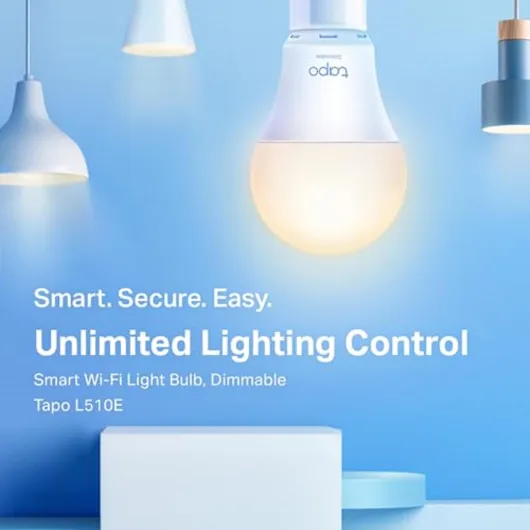
Design-wise, there’s not much to talk about, and that’s kind of the point. It looks like a normal A19 bulb with a white plastic body and glass top. Once it’s in a lamp or ceiling fitting, you basically forget it’s a smart bulb. There’s a small Tapo logo, but you don’t really notice it unless you’re staring at the base. If you’re worried about it looking out of place in a regular lamp, it doesn’t.
The size is pretty standard: about 6 cm wide and 11.2 cm high, so it fit in my existing lampshades without any trouble. I tried it in a narrow IKEA shade and a more open ceiling fixture, and it screwed in fine both times. It’s not one of those bulky smart bulbs that hit the edge of the shade as you twist them in.
One thing I noticed is heat: after a few hours on at full brightness, it gets warm to the touch, but not so hot that you can’t hold it. That’s normal for LEDs, but worth mentioning if you’re putting it in a very tight enclosed fitting. I’ve had no flickering or buzzing, even at low brightness, which is something that annoys me with cheap dimmable bulbs.
In terms of visual impression, it’s pretty neutral. If you’re hoping for some stylish piece of tech, this isn’t it. But in practice, for a bulb that you rarely see directly, I actually prefer this. It looks like a regular bulb, behaves like a regular bulb when you use the wall switch, but you also get the smart features in the background. For everyday use, that’s exactly what I want: invisible tech that just works.
Build quality and long-term feel
The bulb is rated for about 25,000 hours, which in theory means several years of normal use. Obviously I haven’t hit that yet, but after a few weeks of daily on/off cycles and a lot of dimming tests, it still behaves like on day one. No flicker, no odd noises, and no random disconnects once it was properly set up. For a budget smart bulb, that’s already a good sign.
The materials feel standard: glass and plastic with a metal E27 base. It weighs around 70 grams, so it doesn’t feel cheap and hollow, but also not so heavy that you worry about delicate fittings. I accidentally dropped it from about half a meter onto a wooden floor while installing it – not ideal, but it survived without any visible damage and has worked ever since. That’s not a lab test, but it reassured me it’s not super fragile.
Heat is always a concern with smart bulbs, because the electronics are inside. As I said earlier, it gets warm but not alarmingly hot, even after a long evening at 100% brightness. I’ve used it in an indoor fitting only, as recommended. I know some people stick these in outdoor covered fixtures, but personally I’d be careful with that unless it’s well protected and you accept that lifespan might drop.
The 2‑year manufacturer warranty is a plus. It’s not lifetime, but for a cheap bulb that’s acceptable. If it dies within that period, at least you have some backup. Compared to some no‑name smart bulbs I’ve tried from random brands, the Tapo feels more consistent and less like a lottery. It’s not bulletproof, but for normal home use, I don’t have any real durability concerns so far.
Performance and everyday use
On performance, the bulb is mostly solid. Brightness at 100% is decent for a small to medium room. I used it in a hallway and later moved it to a bedroom lamp. In the hallway, one bulb was enough to see clearly at night. In the bedroom, as the main light, it’s fine but not ultra bright – if you like very bright rooms, you might want two bulbs or a higher lumen model. For reading in bed at about 60–70% brightness, I had no issue.
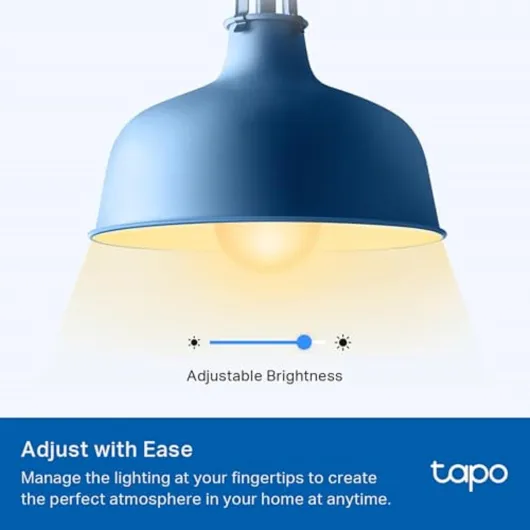
The dimming works, but I agree with the Amazon review saying “it’s dimmable, but not by much”. You can slide from 1% to 100% in the app, but the last part of the range doesn’t feel very linear. Below roughly 10–15%, the bulb is still a bit bright if you like a very soft night light. It doesn’t go down to that barely-on glow some other smart bulbs manage. Still, for normal evening use at 20–40%, it’s comfortable.
Response time is good: from the app or Alexa, the light turns on or off in about a second. There were a couple of moments where my Wi‑Fi was acting up and the bulb took longer to respond or showed as offline in the app, but that’s more on my network than the bulb. When the internet is stable, it’s reliable. I also like that if you cut power with the wall switch, when you turn it back on, the bulb just comes on at the last state or default, instead of doing something weird.
The schedules and away mode are the parts I ended up using the most. I set it to turn on automatically at sunset in the hallway and off at midnight, and that worked every day without me touching anything. Away mode is simple: it turns the light on and off at random intervals to simulate someone being home. I tested it while I was actually home, and it does look reasonably random, not just repeating the same pattern. For a cheap bulb, those small features are actually what make it useful, not just the “wow I can use my voice” factor.
What you actually get with the Tapo L510E
Out of the box, it’s very straightforward: you get the bulb and a small user manual, that’s it. No hub, no extra gear. The bulb is an E27 base, so it screws into most standard fittings. It’s rated at 8.7 W with about 806 lumens, which is basically your classic 60 W equivalent warm white bulb. Colour temperature is around 3000K, so it’s a cosy yellowish light, not that cold hospital white.
The main thing to know is that this bulb is Wi‑Fi only, no Zigbee or anything fancy. It connects directly to your 2.4 GHz Wi‑Fi and then you control it via the Tapo app. Once that’s done, you can hook it up to Alexa or Google Assistant and use voice commands like “turn on hallway light” or “dim bedroom to 30%”. In practice, the integration with Alexa worked fine for me after a quick skill setup.
Feature-wise, it covers the basics: on/off from the app, full dimming, schedules, timers, away mode (random on/off when you’re not home), and device sharing so other people in the house can control it. No colour changing, no fancy scenes beyond brightness presets. It’s clearly aimed at people who just want a simple warm white smart bulb, not a disco in the living room.
On paper, the energy side is a bit weird. It’s listed as Energy Class F, which isn’t great compared to some other LED bulbs, but the actual power draw is still low at under 9 W. So yes, it’s less efficient on the EU label scale, but in real life it’s still miles better than an old incandescent. If you’re obsessed with energy labels, that might bug you. If you’re just trying to cut down from halogens, it’s still a big step up.
Is it actually useful as a smart bulb?
In terms of real usefulness, after a few weeks I’d say it gets the job done. The biggest practical gain is not having to stumble in the dark when I come home with my hands full. I have an Alexa routine that turns this bulb on as soon as I unlock the door and trigger a motion sensor, and it’s been consistent. No more hunting for the switch. It sounds lazy, but once you get used to it, going back to a normal bulb feels annoying.
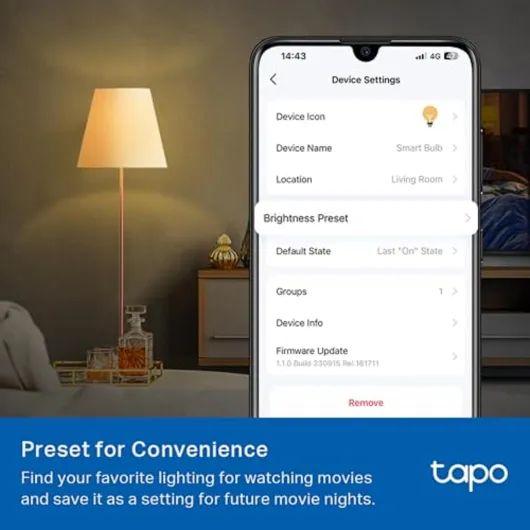
The Tapo app is simple but does the basics well. Creating schedules, timers, and presets is quick. I made a “movie” preset at 30% brightness and a “reading” preset at 70%, and switching between them is one tap. You can also share the device with other people in the house, so my partner can control it from their phone without logging into my account. That avoids the classic “only one person can use the app” problem.
Compared to some more expensive bulbs I’ve used (like Philips Hue), you obviously lose some things: no colour, no advanced scenes, no separate hub to offload traffic from Wi‑Fi. But for a single bulb or a small number of bulbs, the Tapo approach is fine. The Wi‑Fi connection has been stable enough, and I haven’t had random resets or weird behaviour. For simple on/off and dim, plus schedules, it covers what most people will actually use day to day.
Where it’s a bit weaker is flexibility. Since it’s only warm white, you can’t tweak colour temperature for working vs relaxing. And the dimming not going ultra low means it’s not ideal as a pure night light. If you want full control of the atmosphere in a room, this is a bit limited. But if you just want a reliable warm light you can control remotely, it does the job without fuss.
Pros
- Easy setup with the Tapo app and smooth Alexa/Google Home integration
- Decent brightness and pleasant warm white light for everyday use
- Useful schedules, timers, and away mode that actually add convenience
Cons
- Dimming range isn’t very deep at the low end, not great as a night light
- Energy Class F on the label, less efficient than some other LEDs on paper
Conclusion
Editor's rating
After using the Tapo L510E for a few weeks, my overall feeling is pretty clear: it’s a simple, reliable smart bulb that does what most people actually need, without fancy extras. Brightness is decent for small to medium rooms, the warm white light is pleasant, and the app control plus Alexa/Google integration work smoothly once set up. Schedules, timers, and away mode are the real useful bits here, not the novelty of voice control. For everyday routines, it fits in nicely.
It’s not perfect though. The dimming doesn’t go as low as I’d like, so it’s not ideal if you want a very soft night light. The energy label is only Class F, which isn’t great on paper even if the real power draw is still low. And if you’re into coloured lights or tweaking colour temperature, this bulb will feel limited pretty quickly. It’s warm white only, basic and predictable.
I’d recommend this to someone who wants to dip a toe into smart lighting without spending too much, especially if they already have other Tapo gear. It’s also good for hallway, bedroom, or entry lights where you mostly want schedules and remote control. If you’re building a full smart lighting setup with lots of bulbs, colour scenes, and advanced automation, you might be better off with a more complete ecosystem like Hue or a higher-end Tapo model. But as a straightforward, budget-friendly smart bulb, this one is a solid pick.
![NEW White and Colour Ambiance Smart Light Bulb Starter Kit, 75W - 1100 Lumen [E27 Edison Screw] 2 Bulbs + Smart Button - With Bluetooth - Works with Alexa, Google Assistant and Apple Homekit E27 2 Pack Starter Kit + Button](https://www.smart-light-guru.com/storage/1015385/conversions/71yJIPbE0LL._AC_SL1500_-medium.webp)



![L510E Smart Bulb, Smart WiFi LED Light, E27, Works with Amazon Alexa(Echo and Echo Dot), Google Home, Dimmable Soft Warm White, No Hub Required [Energy Class F] 1 Pack](https://www.smart-light-guru.com/storage/939180/71WGq8rBN-L._AC_SL1500_.jpg)