Summary
Editor's rating
Value for money: where it makes sense and where it doesn’t
Design: looks like a normal bulb, behaves like a smart one
Durability and reliability over time
Performance: brightness, colours, and day-to-day use
What you actually get with the Tapo L530E
Effectiveness: does it actually make life easier?
Pros
- Easy setup with no hub required; quickly connects to Wi‑Fi and the Tapo app
- Good brightness (around 800 lumens) and full RGB colours with smooth dimming
- Works reliably with Alexa and Google Assistant for simple voice control
Cons
- No Matter or Zigbee support, so less future‑proof for bigger smart home setups
- App can be a bit slow to open and control compared to some competitors
- Warm white range isn’t very cosy, and the official energy label is F

Specifications
View full product page →| Brand | Tapo |
A cheap way to make a dumb lamp smart
I’ve been slowly swapping a few bulbs at home for smart ones, and the Tapo TP-Link L530E is one I picked up because it was on offer and I already had the Tapo app installed. I’ve used Philips Hue and some random no‑name Wi‑Fi bulbs before, so I had a decent idea of what to expect. I put this one in a bedside lamp and later moved it to the living room to see how it behaved day to day.
In practice, this is a pretty straightforward product: screw it in, connect it to Wi‑Fi, control it with the Tapo app or Alexa/Google Assistant. It’s a full RGB bulb, so you can change colours, dim it, and set schedules. No hub needed, which is nice if you don’t want another box plugged into your router. It runs on 2.4 GHz Wi‑Fi only, which is standard for these cheap bulbs but still worth knowing.
What I was mainly looking for was: is it bright enough to replace a normal bulb, does the app annoy me, and does it randomly drop off the network. After a couple of weeks, I’d say it’s mostly solid on these points. The 800 lumens are fine for a small to medium room, and I didn’t have constant disconnects like I’ve had with some bargain bulbs from Amazon. The app is not lightning fast, but it’s usable.
It’s not perfect. It doesn’t support Matter or Zigbee, so if you’re building a more serious smart home setup, this is a bit of a dead end protocol‑wise. Also, the energy label is F, which doesn’t sound great on paper, even though the actual power draw is low. But for someone who just wants to control a lamp with their phone or voice and play with colours a bit, it gets the job done without too much hassle.
Value for money: where it makes sense and where it doesn’t
Price-wise, this bulb usually sits in the low to mid range for smart RGB bulbs, and it’s often on sale. For what it offers – full colour, dimming, app control, voice control, and no hub needed – I’d say the value is good. If you just want to smarten up one or two lamps, it’s cheaper and simpler than going down the Philips Hue + hub route. You buy the bulb, screw it in, and you’re done. For renters or people who don’t want to invest in a whole ecosystem, that makes a lot of sense.
Where the value is a bit more debatable is if you plan to fill your whole house with smart bulbs. At that point, relying on Wi‑Fi for every bulb isn’t ideal, and the lack of Matter/Zigbee starts to hurt. You might be better off with something like Hue or another system that uses a hub and a more efficient protocol. Also, the energy label being F doesn’t look great on paper, even though the real‑world consumption is still low compared to old bulbs. If you’re really focused on energy efficiency labels, that might bother you.
Compared to random no‑name Wi‑Fi bulbs you can find even cheaper, the Tapo L530E just feels more polished. The app is cleaner, setup is easier, and integration with Alexa/Google is smoother. Also, Tapo as a brand at least has some track record with routers, plugs, and cameras, so it doesn’t feel like a fly‑by‑night brand that will vanish in a year. For a couple of pounds more than the absolute cheapest options, that’s worth it to me.
So in short: if you want one or a few bulbs, already use or don’t mind using the Tapo app, and don’t care about Matter/Zigbee, the value is strong. If you’re planning a big, future‑proof smart home setup, this is more of a budget stopgap than a long‑term core piece. It’s decent, it works, and at the right price it’s hard to complain too much.

Design: looks like a normal bulb, behaves like a smart one
Design-wise, there’s not a lot to say, and that’s probably a good thing. It looks like a standard A19 bulb with an E27 screw base. The body is white plastic with a frosted dome on top. It doesn’t scream “tech gadget” when it’s in a lamp; it just looks like a regular LED bulb. That’s fine for me – I’d rather it disappear into the lamp than stand out. The dimensions (about 6 cm diameter, 11.5 cm tall) are similar to most LED bulbs I’ve used, so it fit in all my fixtures without any drama.
The weight is light (around 70 g), so it doesn’t pull on flexible lamp heads or cheap fittings. Some smart bulbs can be a bit chunky or long and stick out of smaller lampshades; this one is pretty standard. I tried it in a bedside lamp with a small shade and in a basic ceiling fitting. No issues with clearance or overheating that I could notice – the casing got warm but never hot to the touch, even after a few hours at full brightness.
From a user point of view, the most important bit of “design” is how it reacts to the physical switch. If you turn the wall switch off, you obviously lose smart control until you switch it back on. When you turn the power back on, you can set whether it comes back in the last state or a default one. I left it on last-state mode, and it behaved as expected: if it was dim red at night, it came back dim red, not blinding white. That sounds small, but at 3 a.m. it matters.
The only downside on design, in my opinion, is the colour temperature range on white. It tops out at 6500K and doesn’t go very warm on the other end. The “warm white” is more like a neutral warm, not that very cosy yellow you get with some bulbs around 2200–2700K. For a living room, it’s fine but not super cosy. For kitchens, desks, and general use, it’s perfectly okay. So visually, it’s a pretty neutral, no‑nonsense bulb that blends in and does its thing.
Durability and reliability over time
I obviously haven’t had this bulb for years, but I did leave it running for long stretches to see how it behaved. For a couple of weeks, it was on for most of the evening and part of the night, and there were no obvious issues: no flickering, no weird buzzing, and no random resets. The casing gets warm but not worrying. It’s rated as an indoor bulb, so I only used it inside; I wouldn’t risk it in a damp bathroom ceiling without good ventilation, and definitely not outside.
Build quality feels decent for the price. It’s plastic, sure, but the base screws in firmly, and it doesn’t feel like it’s going to fall apart when you tighten it. Compared to some cheaper generic Wi‑Fi bulbs I’ve tried, this one feels a bit more solid and less “toy‑like”. The 2‑year manufacturer warranty is at least some reassurance that it’s not meant to die after six months, though obviously you only find out long‑term reliability after a year or two.
In terms of software reliability, the Tapo app and cloud seem fairly stable. I didn’t have the bulb disappear from the app randomly. Firmware updates are handled through the app; mine prompted for an update once, it took a couple of minutes, and then it was done. After that, connection stayed stable. That’s better than some brands where each update is a gamble. Still, you are depending on TP-Link keeping their servers alive long‑term, which is the usual Wi‑Fi smart device trade‑off.
One thing to keep in mind: if you constantly kill power at the wall switch instead of leaving it on and using the app/voice, you’ll probably shorten the effective “smart” life of the bulb just because it’ll be reconnecting all the time and you’ll lose some of the benefit. Used as intended – power always on, control via app or voice – it seems like it can handle regular daily use without drama. I’d rate durability as “pretty solid for the price”, but not something I’d bet my whole house lighting on without a backup plan.
Performance: brightness, colours, and day-to-day use
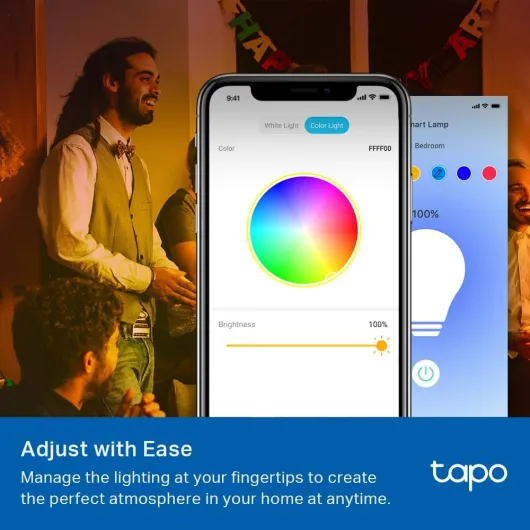
In daily use, the bulb is bright enough for most normal rooms. At 800 lumens, it handled my small living room on its own without feeling dim, and in a bedroom it’s more than enough. Compared to a Philips Hue colour bulb I have, I’d say brightness is in the same ballpark, maybe slightly less punchy on some colours but nothing dramatic. White light at full power is strong and clean; it doesn’t flicker or buzz. For reading or working at a desk, it’s perfectly usable.
On the colour side, you get the usual 16 million colours claim. Realistically, the main ones you’ll actually use are red, blue, green, and some softer pastel tones. Strong reds and blues look good; greens are okay but a bit washed out compared to more expensive bulbs. If you’re just using it for mood lighting, movie nights, or a kids’ room, it’s absolutely fine. If you’re picky about colour accuracy or want perfect skin tones for photography, this isn’t that level – the CRI is around 80, which is standard but not pro‑grade.
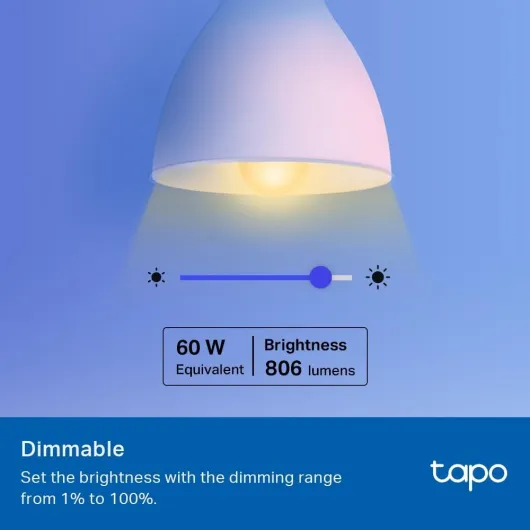
The dimming range from 1% to 100% works well. At 1–5%, it really is very low, which is nice for night feeds, going to the bathroom at night, or just not waking everyone up. One thing I liked is being able to set a very low red light for late-night use; it’s easier on the eyes and doesn’t fully wake you up. There’s no obvious stepping or sudden jumps in brightness; it fades smoothly when you adjust it via the app or voice.
Connectivity-wise, it’s been pretty stable. It needs 2.4 GHz Wi‑Fi, but once connected, I didn’t have random dropouts. The only time it “disappeared” was when my router rebooted; it came back on its own after the network was up again. The downside is no Matter or Zigbee support, so if you care about local control and open standards, this bulb is limited. It does work with Alexa, Google Assistant, and even Home Assistant (with some setup), so most casual users will be satisfied. For the price, the overall performance is solid: bright, responsive enough, and reliable most of the time.
What you actually get with the Tapo L530E
Out of the box, it’s as basic as it gets: you get the bulb and a small user manual, nothing else. No remote, no hub, no extra bits. You screw it into any E27 socket (standard screw fitting), turn the light on, and it pops into pairing mode. The bulb is rated at around 8.3–8.7 W and about 800 lumens, which roughly matches a typical 60 W old‑school incandescent in brightness. It supports full RGB plus white up to 6500K, so you can go from warm-ish white to cold white and any colour in between.
The main selling points are pretty clear: no hub required, works with Alexa and Google Assistant, full colour, and control via the Tapo app. Everything runs over Wi‑Fi (2.4 GHz). That’s convenient because you don’t need extra hardware, but it also means you’re relying on your router and cloud services. If your Wi‑Fi is flaky, your bulb will be too. The bulb can also store its last state, so when you cut power and turn it back on, it can come back exactly as it was (or you can tweak that behaviour in the app).
Feature‑wise, the app lets you set schedules, timers, away mode, and scenes. Away mode is basically random on/off to make it look like someone’s home. Scenes are pre‑saved colour/brightness combos you can recall with one tap or via voice. There’s also sunrise/sunset automation based on your time zone, which is handy if you want lights to follow daylight without constantly adjusting times.
Overall, the presentation is pretty “what you see is what you get”. It doesn’t pretend to be a high‑end smart home device. It’s more like: here’s a Wi‑Fi bulb that does colours, dimming, basic automations, and voice control for a lowish price. If you’ve used other Tapo gear (plugs, cameras, etc.), it drops straight into the same app, which is honestly the main reason I’d pick this over some random unbranded bulb.
Effectiveness: does it actually make life easier?
In terms of actually making life easier, it does the basics well. Being able to turn the light on before entering a dark room sounds minor, but when you come home with full hands or a sleeping baby, it’s genuinely practical. I’ve used it a lot in the bedroom: I tell Alexa to dim the light or switch to a warm low setting without fumbling for the switch. For night-time, the red or very dim warm white has been good for not fully waking me up when I get up quickly.
The scheduling and timer features are also useful. I set it to turn on gradually in the morning at a low brightness and then ramp up. It’s not as advanced as a dedicated wake‑up light, but it does the job. The away mode is simple but effective: it randomly turns the light on and off in the evening to simulate presence. Is it foolproof security? Obviously not. But as an extra layer, it’s fine and it costs nothing once it’s set up.
Voice control works well overall. Commands like “Alexa, set living room light to 30%” or “Hey Google, turn the light red” were recognised and applied in a couple of seconds. There’s a small delay, which is normal for cloud‑based stuff, but nothing that bothered me. The only time it felt slightly slow was when the Tapo app itself was waking up from cold start; opening the app, tapping the bulb, and changing colour can take a few seconds. It’s not painful, but it’s not instant either.
Where it falls a bit short is on deeper smart home integration. Because there’s no Matter or Zigbee, you’re a bit tied to the Tapo ecosystem plus the big assistants. If you want complex automations across multiple brands, you’ll have to rely on Alexa/Google routines or Home Assistant. That’s okay for basic stuff like “turn this on when I arrive home”, but more advanced users might find it limiting. For everyday use though – remote control, dimming, colours, timers – it delivers what it promises without drama.
Pros
- Easy setup with no hub required; quickly connects to Wi‑Fi and the Tapo app
- Good brightness (around 800 lumens) and full RGB colours with smooth dimming
- Works reliably with Alexa and Google Assistant for simple voice control
Cons
- No Matter or Zigbee support, so less future‑proof for bigger smart home setups
- App can be a bit slow to open and control compared to some competitors
- Warm white range isn’t very cosy, and the official energy label is F
Conclusion
Editor's rating
The Tapo TP-Link L530E is a straightforward smart bulb that does what most people actually need: it’s bright enough, it changes colour, it dims, and you can control it from your phone or with your voice. Setup is quick, the app is fairly simple, and it slots nicely into Alexa or Google Assistant. In everyday use, it’s been stable and predictable, with no annoying disconnects or random behaviour. For a bedroom, living room lamp, or kids’ room, it’s a solid pick, especially if you catch it on discount.
It’s not perfect. The lack of Matter and Zigbee means it’s not the best choice if you’re trying to build a more serious, future‑proof smart home. The app can feel a bit slow to open, the warm white isn’t super cosy, and the F energy label isn’t exactly flattering, even if the actual power draw is still low. But for someone who just wants to make a lamp smart without buying a hub or learning a whole ecosystem, it gets the job done with minimal hassle. If you already have Tapo gear, it’s an easy yes. If you’re starting from scratch and planning a big setup, I’d think twice and maybe keep this for secondary rooms or as a budget option.
![NEW White and Colour Ambiance Smart Light Bulb Starter Kit, 75W - 1100 Lumen [E27 Edison Screw] 2 Bulbs + Smart Button - With Bluetooth - Works with Alexa, Google Assistant and Apple Homekit E27 2 Pack Starter Kit + Button](https://www.smart-light-guru.com/storage/1015385/conversions/71yJIPbE0LL._AC_SL1500_-medium.webp)





![TP-Link Smart Bulb, Smart WiFi LED Light, E27, 8.3W, Works with Amazon Alexa(Echo and Echo Dot) and Google Home, Colour-Changeable, No Hub Required L530E [Energy Class F]](https://www.smart-light-guru.com/storage/939170/61umAkCvEzL._AC_SL1000_.jpg)