Summary
Editor's rating
Value for money: where it stands versus pricier options
Design: looks like a normal bulb, and that’s fine
Packaging and setup experience
Build quality, lifespan and reliability over time
Performance: brightness, colours and responsiveness in real life
What you actually get with the Tapo L530B
Everyday effectiveness: does it actually make life easier?
Pros
- Bright enough for a main light in a typical room with smooth dimming via app or voice
- No hub required, easy setup with Tapo app and quick Alexa/Google integration
- Good value for money with full RGB colours, schedules and remote control
Cons
- Doesn’t work properly with traditional dimmer switches; needs a simple on/off switch
- Colour themes and transitions are basic and not very customisable
- Loses all smart functions if someone turns the wall switch off

Specifications
View full product page →| Brand | Tapo |
A cheap way to test smart lighting without redoing your whole house
I’ve been using the Tapo L530B B22 smart bulb for a few weeks in my living room, and I’ll be honest: I bought it mainly because it was cheaper than most Philips Hue stuff and didn’t need a separate hub. I just wanted to see if a smart bulb would actually change anything in day-to-day life or if it was just another gadget I’d forget about after a week. I put it in a standard ceiling fitting with a simple on/off wall switch, nothing fancy.
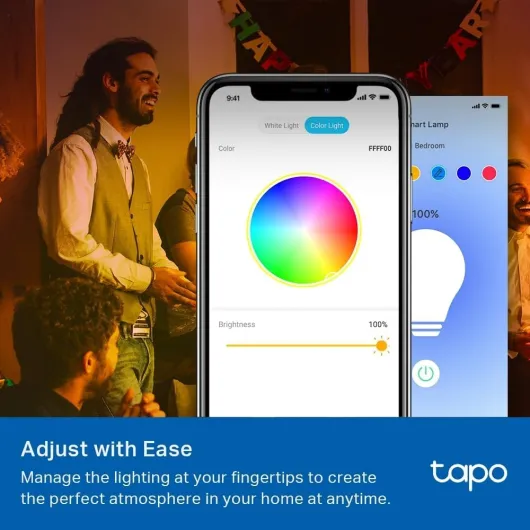
In practice, it slotted into my routine pretty quickly. I use it with Alexa and the Tapo app, and most of the time I control it by voice or from the sofa with my phone. The basic stuff – turning it on, dimming, switching from cold to warm white – is what I use the most. The coloured modes are more for fun in the evening or when friends are over, but they’re not just a gimmick, they’re actually usable.
What surprised me is how quickly I got used to not touching the wall switch. When I get home, I open the door, say “Alexa, lights on” and that’s it. If I forget to turn it off when I leave, I just kill it from the app. It’s not perfect, there are some small annoyances I’ll explain, but overall it does what it says without drama. For the price, it feels like a decent entry point into smart lighting.
If you’re expecting super advanced scenes, ultra-smooth colour transitions or pro-level home automation, you might find it a bit basic in some areas. But if you just want a normal bulb that can change colour, be dimmed properly and be controlled by voice and phone, this one gets the job done pretty well. Think of it as a practical upgrade more than a flashy toy.
Value for money: where it stands versus pricier options
On price, this bulb sits in the “affordable smart” category. It’s cheaper than Philips Hue and some big-name competitors, and you don’t need to buy a separate bridge or hub, which already saves money. You just pay for the bulb, install the free app, and that’s it. For that price, you get full RGB colours, dimming, schedules, voice control with Alexa/Google, and remote control from outside the house. That’s a decent feature set for the cost.
Compared to more expensive ecosystems like Hue, you do lose a few things: the colour transitions are less polished, the themes are basic, and the app is more functional than fancy. But if you’re mainly after a bulb you can dim, change colour on, and control by voice, paying double or triple for a premium brand doesn’t make much sense for most people. I’ve used Hue before, and yes, it’s smoother and more integrated, but for a single room or a small flat, this Tapo bulb gives you 80–90% of the real-world benefit for a lot less money.
Energy-wise, 8.7W for 806 lumens is standard for LED smart bulbs. It’s not the most efficient product on the planet (EU label F), but it’s still far better than old incandescent bulbs. At 25% brightness, my smart meter barely moves, and I don’t feel guilty leaving it on low while I’m moving around the flat. Considering the lifespan rating of 25,000 hours, if it lasts even close to that, the cost per year is low.
So, in terms of value, I’d say it’s good value for money if you want an easy, cheap way to dip your toes into smart lighting. It’s not the fanciest option, but it does the core job well: reliable, bright enough, decent colours, and a solid app. If you’re kitting out a whole big house with complex scenes and automations, you might want a more advanced system. But for one or a few rooms, or as a first smart bulb, the value here is hard to argue with.

Design: looks like a normal bulb, and that’s fine
Visually, the Tapo L530B is nothing fancy. It looks like a standard pear-shaped A19 bulb with a white plastic body and a B22 bayonet base. If you’re expecting some high-end design statement, this isn’t it. Once it’s in a ceiling fitting or lamp, you barely notice it’s a smart bulb, which in my opinion is actually a good thing. It doesn’t clash with anything and just blends in like a regular bulb.
The bulb is fairly light at around 70g, and the plastic casing doesn’t feel premium, but it doesn’t feel cheap to the point of worrying either. It’s more “functional” than “nice object”. The diffuser dome spreads light evenly enough; I didn’t spot any weird hot spots or patchy colours on my walls. When set to white, the light is uniform. With colours, you occasionally see a slight difference in intensity at certain angles, but nothing dramatic, especially if it’s in a shade or a ceiling fitting.
One thing to note: because it’s a smart bulb, it does not play well with traditional dimmer switches. If you have a wall dimmer, you’re supposed to leave it at full power or replace it with a normal on/off switch. I tried leaving mine at half and the bulb started acting weird (flickering, delays). Once I set the switch to full and used only the app/Alexa to dim, everything was fine. So in terms of design, it’s really made for a simple on/off wall switch and digital dimming only.
In short, the design is basic but practical. It doesn’t scream “tech gadget”, which is probably what most people want for a ceiling light. The important point is that it fits into standard fittings without any issue, doesn’t overheat in normal use, and the light output is even enough. If you want stylish, decorative bulbs with visible filaments, this is not that. If you just need a smart light that looks like a normal bulb, it does the job.
Packaging and setup experience
The packaging is simple and functional. You get a small cardboard box with basic branding, the bulb in a cardboard holder, and a folded quick start guide. No plastic overload, no fancy presentation. It’s the kind of box you open, take out the bulb, read one page, and throw away. For this type of product, that’s perfectly fine. I don’t need glossy inserts or marketing slogans, I just want it protected in transit and easy to understand, and that’s what you get here.
The quick start guide is clear enough, with diagrams showing how to screw in the bulb, turn the switch on, and download the Tapo app. The app itself does most of the explaining once you launch it. It detects that you want to add a bulb, asks you to connect to the bulb’s temporary Wi‑Fi, then hands it over to your home network. The process is guided step by step with illustrations, which is nice if you’re not very techy. As long as you follow the instructions and don’t run a VPN or weird network setups, it’s straightforward.
One detail that could be improved: the packaging doesn’t clearly shout “don’t use with dimmer switches”, which I think should be more visible. It’s in the documentation, but many people don’t read that in detail. If you plug it into a dimmer and it misbehaves, you might think the bulb is faulty. A big icon or warning on the box would avoid that confusion. Otherwise, all important specs (806 lumens, 8.7W, B22, Wi‑Fi, colour changing) are printed clearly.
Overall, the unboxing and setup experience is very straightforward and no-nonsense. It feels more like opening a regular LED bulb with extra instructions than some fancy tech gadget. If you’re buying a few bulbs at once, you won’t be drowning in useless plastic or paperwork. It’s not stylish, but it’s practical and gets you from box to working light in a few minutes, which is exactly what you want.
Build quality, lifespan and reliability over time
The bulb is rated for about 25,000 hours, which on paper is years of use if you run it a few hours a day. Obviously I haven’t had it long enough to confirm that, but so far I haven’t seen any flickering, buzzing, or weird behaviour once it was properly installed with a normal on/off switch. The plastic body never got more than warm to the touch, even after being on at full brightness for several hours in the evening. That’s pretty normal for an LED bulb of this kind.
In terms of build quality, it feels like a typical mid-range LED bulb. It doesn’t feel super robust, but it also doesn’t feel like it’s going to fall apart in your hand. The bayonet fitting locks in firmly and doesn’t wobble in the socket. I’ve removed and reinstalled it a couple of times when rearranging lamps, and there were no signs of looseness or connection issues. The internal electronics seem stable – no random reboots or strange colour glitches so far.
Wi‑Fi reliability has been good. My router is in another room and the signal is not perfect everywhere, but the bulb has stayed connected. No random “unreachable” status in the app, which is something I’ve had with cheaper Wi‑Fi plugs. The only time I had to reset anything was during first setup because of the VPN situation. Since then, firmware updates have been smooth and quick. I let the app update the bulb once, and it took maybe a minute, with no problems afterward.
There is still one unknown: how it will hold up after 1–2 years of daily use, especially with frequent on/off cycles and colour changes. Some smart bulbs tend to get slower or less reliable over time. But given the brand (Tapo is TP-Link’s sub-brand) and the 2-year manufacturer warranty, I’m reasonably confident it’s not total junk. If you want something indestructible, there are probably more expensive options, but for a budget smart bulb, the durability and reliability so far are perfectly acceptable.
Performance: brightness, colours and responsiveness in real life
On performance, the bulb is honestly pretty solid for the price. At full white brightness (100%), it easily lights up my living room of about 4x4 metres as the main source of light. In a larger room, you might want two bulbs, but for a bedroom, office or average lounge, one is fine. I usually keep it around 30–40% in the evening, and that’s comfortable for TV and general tasks. For reading, I push it closer to 70–80%. The dimming is smooth in the app and via Alexa; I didn’t notice any major jumps in brightness.
The white colour temperature range is useful: you can go from a warm, cosy light (around 2500K) to a cooler, more neutral white for work. I use the warm setting at night and a cooler one when I’m working at the table. The colours are decent: red, blue, green and purple are clearly visible and not washed out. It’s not as rich as high-end bulbs, but good enough to change the mood of a room. As with most RGB bulbs, coloured modes are less bright than white. If you set it to a dark blue or deep red and expect the same brightness as white, you’ll be disappointed. That’s normal for this type of product.
In terms of responsiveness, the bulb reacts quickly. From the Tapo app, changes happen in about a second or less. With Alexa, voice commands are usually executed almost instantly. I’ve had no dropouts with Wi‑Fi so far, and when I accidentally turned the wall switch off and back on, it reconnected without any drama. The only time I had trouble was during the initial setup when my phone was on a VPN; once I disabled that, it paired fine and never gave me issues afterward.
There are a couple of performance annoyances though. The built-in themes that automatically change colours are frankly a bit weak. They either jump from one colour to another or fade to black then switch colour and fade back in. There’s no smooth continuous rainbow cycle like on some cheap remote-controlled RGB bulbs, which feels odd. Also, the “gradual on/off” feature is almost pointless because the transition is too fast; it takes less than a second, so it doesn’t feel like a real sunrise or sunset effect. These are software limitations more than hardware ones, but they do limit what you can do if you like dynamic lighting.
What you actually get with the Tapo L530B
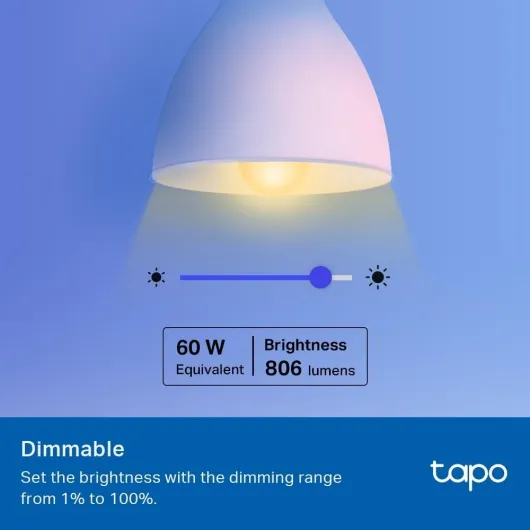
Out of the box, it’s very simple: you get the bulb and a small user manual, that’s it. No hub, no remote, no extra accessories. The bulb is a standard B22 bayonet fitting, 8.7W LED, roughly equivalent to a 60W incandescent. Brightness is listed at 806 lumens, which in real life is enough to light a medium-sized room as the main light if you use white at full power. It connects directly to Wi‑Fi, so you only need your router and the free Tapo app on your phone.
The app setup is straightforward: screw in the bulb, turn the switch on, the bulb starts blinking, and the app walks you through connecting it to your Wi‑Fi. It took me around 3–4 minutes. Just note one important detail: if you’re on a VPN on your phone, the pairing can fail, like one of the Amazon reviewers mentioned. Once paired, you can rename the bulb (e.g. “Living Room Light”) and link it to Alexa or Google Assistant. After that, voice commands work like “turn living room light on”, “set living room light to 30%” or “set living room light to blue”.
Feature-wise, the bulb covers the basics you’d expect: dimming from 1% to 100%, full colour selection (millions of colours in theory), warm to cool white, timers, schedules, and an away mode that randomly turns the light on and off to make it look like someone’s home. There’s also a useful option to choose what the bulb does when power comes back: either return to the last state or use a fixed colour and brightness you set. That sounds minor, but in daily use it’s actually handy.
Overall, in terms of what’s promised versus what you get, it’s pretty honest. No fancy packaging, no luxury feel, just a basic smart bulb with a decent app and the key functions: remote control, colours, and voice control. If you already live in the Alexa/Google ecosystem, it fits in easily. If you’re new to smart home stuff, it’s not hard to get going, as long as you’re comfortable installing an app and following on-screen steps.
Everyday effectiveness: does it actually make life easier?
Day to day, this bulb is less about “wow” effects and more about small conveniences that pile up. For me, the big win is simply not having to get up to hit the switch. Lying in bed and asking Alexa to turn off the light sounds lazy, but when you’re half asleep, it’s very handy. Same when I come home with my hands full: I walk in, say the command, and the room lights up. It’s a small thing, but after a week you get used to it fast.
The schedules and timers are practical. I set a schedule so the light turns on at low brightness in the morning around the time my alarm goes off. It’s not a proper sunrise lamp because the fade-in is too quick, but at least I’m not waking up in complete darkness. In the evening, I have a timer that slowly dims the light around the time I usually go to bed. Again, the transitions could be smoother and slower, but it still nudges me to wind down. Away mode is also useful when I’m out for the weekend – the light goes on and off randomly and gives the impression someone is home.
Remote control from the app is another thing I use more than I expected. A couple of times I left the house and realised on the bus that the light was still on. Two taps in the Tapo app and it’s off. You can also check if it’s on or off at any time, which is reassuring. Device sharing is handy too: I shared control with another family member, so they can also manage the light from their phone without messing with my account.
There is one structural limitation you can’t really avoid: if someone turns the switch off at the wall, the bulb is dead to the app and Alexa until the switch is turned back on. That’s just how smart bulbs work. In my case, I had to tell everyone at home: “Don’t touch the switch, use your voice or the app.” Once that habit is in place, it’s fine, but if you live with people who will always go for the physical switch, you’ll lose the smart part half the time. So in terms of effectiveness, it works well, but it does rely on everyone playing along.
Pros
- Bright enough for a main light in a typical room with smooth dimming via app or voice
- No hub required, easy setup with Tapo app and quick Alexa/Google integration
- Good value for money with full RGB colours, schedules and remote control
Cons
- Doesn’t work properly with traditional dimmer switches; needs a simple on/off switch
- Colour themes and transitions are basic and not very customisable
- Loses all smart functions if someone turns the wall switch off
Conclusion
Editor's rating
After using the Tapo L530B smart bulb daily, my overall feeling is pretty simple: it’s a solid, no-drama smart bulb that does what most people actually need. It’s bright enough to be a main light in a normal room, it switches between warm and cool white easily, and the colour modes are fun without being useless. Voice control with Alexa works reliably, the app is clear, and I haven’t had any dropouts or weird behaviour once it was set up correctly.
It’s not perfect, though. The built-in colour themes are basic, there’s no smooth rainbow-style transition, and the gradual on/off is too quick to feel like a proper sunrise or sunset. The plastic build is more functional than nice, and you have to accept the usual smart bulb limitation: if someone kills the wall switch, the “smart” part is gone until they turn it back on. But for the price, those compromises are tolerable.
If you want to try smart lighting without spending a lot or messing with hubs and extra hardware, this bulb is a good starting point. It fits best for small to medium rooms, people already using Alexa or Google Assistant, and anyone who just wants remote control, dimming, and colour options without overthinking it. If you’re building a big, complex smart home with advanced scenes and perfect colour transitions, you’ll probably be happier with a more expensive ecosystem. For everyone else, this Tapo bulb is a practical, good value option that gets the job done day to day.
![NEW White and Colour Ambiance Smart Light Bulb Starter Kit, 75W - 1100 Lumen [E27 Edison Screw] 2 Bulbs + Smart Button - With Bluetooth - Works with Alexa, Google Assistant and Apple Homekit E27 2 Pack Starter Kit + Button](https://www.smart-light-guru.com/storage/1015385/conversions/71yJIPbE0LL._AC_SL1500_-medium.webp)