Summary
Editor's rating
Value for money: pricey, polished, and definitely not for everyone
Design: clean look, good colours, but the brackets are a bit picky
Everyday comfort: living with it on for hours
Build quality and durability: feels solid, but not really future-proof if you change monitors a lot
Performance and sync: bright, responsive, but tied to the Hue ecosystem
What you actually get in the box and how it all hooks up
Pros
- Very smooth gradient lighting with strong colours and good brightness
- Reliable screen sync via the Hue Sync PC app with low visible latency
- Integrates well with other Philips Hue lights and scenes through the Bridge
Cons
- High price compared to simpler LED strips and non-Hue alternatives
- Requires a Hue Bridge and network connection at all times, adding cables and complexity
- Mounting brackets can be tricky on curved or non-standard monitor backs and the size is not flexible

Specifications
View full product page →| Brand | Philips Hue |
RGB behind the monitor, but actually done right
I’ve been messing around with RGB stuff for years – cheap LED strips from Amazon, Govee kits, even some weird no-name light bars. Most of them look cool for a week and then start to annoy you with clunky apps, bad colours, or just falling off the back of the screen. I picked up the Philips Hue Play Gradient PC Lightstrip + Hue Bridge bundle to see if paying the higher price actually buys you something better, or if it’s just the Philips logo tax.
I’ve been using the 32–34 inch version on a 34-inch ultrawide monitor for a bit now. I use it for a mix of PC gaming at night, general desk work during the day, and some Netflix/YouTube sessions. So it’s not just a toy for screenshots – it’s on for hours every day. I already had a couple of Hue bulbs at home, so I knew the ecosystem a bit, but this is my first Gradient strip and first time syncing it with the screen properly.
The bundle I tested includes the lightstrip + Hue Bridge, so it’s basically a starter kit. No extra sync box here – the idea is you use your PC with the Hue Sync app. Setup is supposed to be simple: plug the Bridge into your router, stick the strip on the back of the monitor, pair everything in the app, and you’re done. In practice, it’s mostly that easy, but there are a few small annoyances I’ll get into.
If you’re wondering whether this is actually worth the money compared to a cheaper Govee or random RGB strip, or whether it’s just another gimmick, I’ll go through what worked well for me, what felt a bit overhyped, and where Philips is clearly charging a premium. It’s not perfect, but it does a few things that cheaper kits usually mess up.
Value for money: pricey, polished, and definitely not for everyone
Let’s be blunt: this isn’t cheap, especially once you realise you’re paying not just for a strip, but also for the Hue Bridge and the whole smart ecosystem. If all you want is a static white bias light behind your monitor, you can spend a fraction of the money and be perfectly happy. So the question is really: are the extra features and better polish worth the premium?
For me, the value mainly comes from three things:
- Very clean, smooth lighting with proper gradients and strong colours
- Stable software and app that doesn’t feel like a random cheap brand
- Integration with other Hue lights if you already have them or plan to
If you’re already in the Hue world, the value is better, because the Bridge isn’t just for this strip – it can manage all your lights. In that case, the bundle makes some sense as a starter kit. If this is your first and only Hue product, the price stings more, and you might feel like you’re paying a lot for a fancy backlight. It’s good, but it’s still just lighting behind a monitor at the end of the day.
So my honest take: good product, expensive ecosystem. If you care about a polished experience, solid colours, and easy integration with other smart lights, it feels justified, even if it’s not exactly a bargain. If you’re on a tight budget or don’t care about screen sync and app control, you can definitely get cheaper options that will "get the job done" for simple ambient light.
Design: clean look, good colours, but the brackets are a bit picky
Design-wise, this is one of the better-looking monitor light solutions I’ve used. The strip itself is thick, with a silicone diffusion layer that hides the individual LEDs nicely. When it’s on, you get a smooth bar of colour instead of a dotted Christmas-light effect. When it’s off, it just looks like a solid white-ish strip around the back edge – not pretty, but you don’t see it anyway once the monitor is against the wall.
The big difference compared to a basic RGB strip is that this is a gradient strip. That means it can show multiple colours at the same time along its length, not just one colour across the whole thing. In practice, that’s what gives you that “the left side of the screen is red, the right side is blue” kind of effect on the wall. It’s not perfect pixel matching, but it feels a lot more dynamic than a single-colour bias light. For games and colourful content, it actually looks pretty cool and does make the wall behind the monitor feel alive.
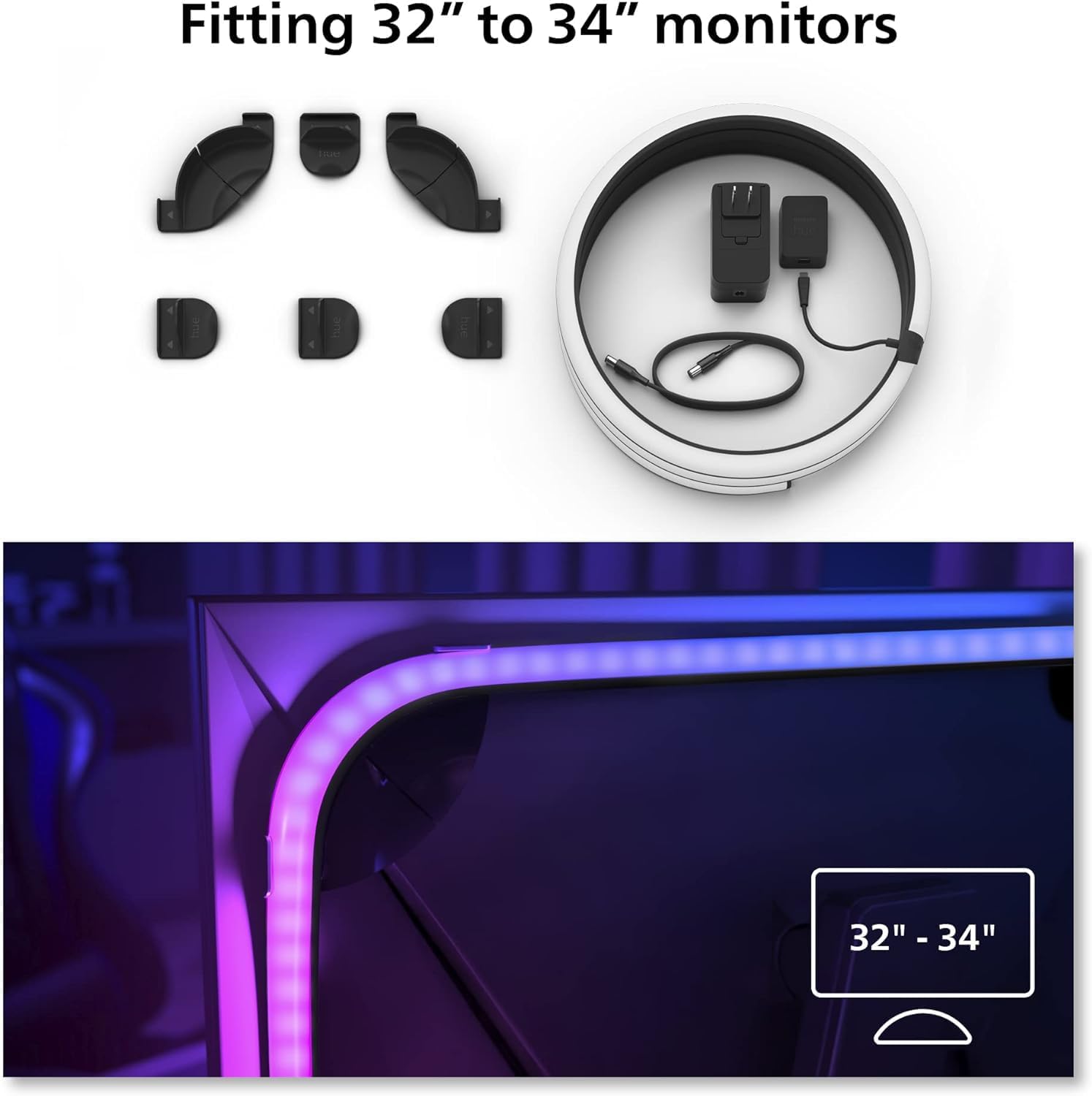
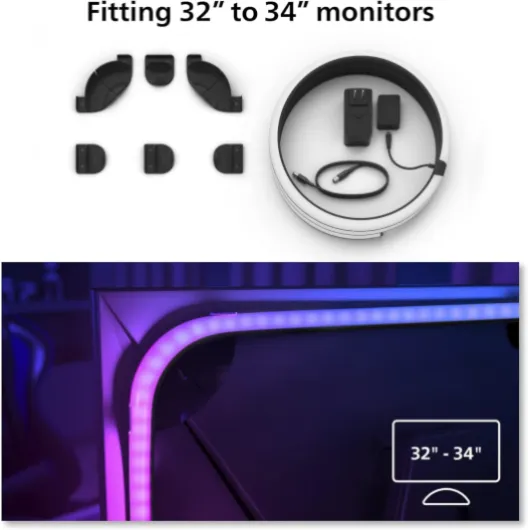
The mounting brackets are where the design is a bit hit-or-miss. They’re clearly made for mostly flat-backed monitors with a defined edge. On my 34-inch curved ultrawide, they held, but I had to play around to get them to sit properly, and I wouldn’t say the fit is perfect. If you’ve got a very chunky stand or a weirdly shaped back panel, expect some swearing and trial-and-error. The strip length (116.5 cm) is sized fine for 32–34 inch, but there’s no elegant way to deal with extra slack if your monitor is on the smaller end of that range.
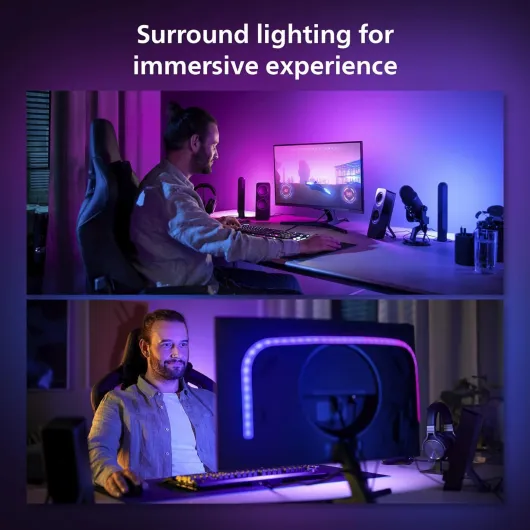
Visually when it’s running, though, the design does its job. Colours are strong, transitions look smooth, and the strip wraps around the sides enough that you get a nice halo on the wall, not just a straight bar. If you care about a clean, cohesive look and hate exposed LED dots or ugly power bricks dangling everywhere, this feels more thought-through than the cheap roll of LEDs most people tape to the back of their screens. Just be prepared to wrestle a bit with the brackets if your monitor isn’t a basic rectangle.
Everyday comfort: living with it on for hours
In terms of day-to-day comfort, this lightstrip is actually pretty easy to live with, as long as you tweak the settings a bit. Out of the box, the default brightness and intensity can feel a bit aggressive in a dark room. After a couple of late-night gaming sessions, I realised I needed to dial it down. Once I set up a couple of scenes with lower brightness and warmer tones for general desktop use, it became a lot more comfortable on the eyes.
For normal work (browsing, coding, Office stuff), I rarely use the full sync mode. It’s distracting to have the wall flashing every time a window changes. Instead, I just use it as a static bias light with a warm white or a soft colour. In that use case, it’s actually great: it reduces the contrast between the monitor and the dark wall, and I get less eye strain during evening sessions. It’s basically a fancy bias light with extra features. The fact it can also match the rest of my Hue lights in the room is a nice bonus.
Noise-wise, there’s none. No coil whine, no hum, nothing. The power brick gets mildly warm but not hot. I’ve run it for 5–6 hours straight multiple evenings and never had any heat issues. The Hue app control is convenient once you get used to it – I just turn everything on/off from my phone or through routines. That said, if you hate using your phone to control lights and prefer a physical switch, this setup will annoy you. There’s no simple hardware remote in the box.
So in terms of comfort: once it’s configured, it works well in the background and doesn’t demand attention. The only real annoyance from a “living with it” perspective is that you need the Bridge powered and hooked to the router 24/7, and you have to run the PC Sync app if you want live screen-based effects. If you’re okay with that, it’s a nice upgrade for both ambience and eye comfort. If you want pure plug-and-play with zero software, this system is too involved.
Build quality and durability: feels solid, but not really future-proof if you change monitors a lot
From a build quality point of view, the strip feels sturdier than the usual cheap roll of LEDs. The silicone coating is thick, the cable strain relief looks decent, and the connectors don’t feel like they’ll fall apart if you move your desk once. I’ve bent it a fair bit while mounting it around the curve of my ultrawide, and there are no visible stress marks or weird kinks. It holds its shape well and doesn’t feel like it’s going to crack over time.
I’ve been running it regularly for long sessions and haven’t seen any flicker, dim spots, or colour inconsistency so far. Philips gives a 2-year manufacturer warranty, which is pretty standard for this kind of product. Based on my experience with other Hue stuff I own, they usually last several years without issues, so I’m not too worried about lifespan. It’s also clearly meant for indoor use only – there’s no water resistance, so don’t try to get creative and use it behind a bathroom mirror or something.
The downside in terms of durability is more about future flexibility. This strip is sized and shaped specifically for 32–34 inch monitors. If you upgrade later to a 27-inch or jump to a 49-inch super ultrawide, this particular strip won’t fit nicely. It’s not something you can just cut and re-solder easily like a basic LED reel. So yes, the product itself feels durable, but it’s locked to a certain monitor size range. If you change screens every year, that’s something to think about.
Overall, I’d say the physical durability is solid for indoor desk use. The cable, the strip, and the brackets don’t feel flimsy. Just don’t expect it to adapt well if you constantly reconfigure your setup or move it between different monitors with very different shapes. It’s more of a “install it once and forget it” kind of product rather than a modular, endlessly reusable strip.
Performance and sync: bright, responsive, but tied to the Hue ecosystem
In actual day-to-day use, the performance is pretty solid. Brightness is high enough (around 900 lumens) that at night it can light up the whole wall and a good chunk of the room. I usually end up lowering the brightness to around 50–70% for longer sessions, otherwise it feels like a bit much in a dark room. The colour range is wide: you’ve got proper deep reds, rich blues, and decent warm-to-cool whites. It’s not washed out like some cheaper strips I’ve tried, where everything looks the same shade of pastel.
For screen sync, I used the Philips Hue Sync app on Windows. Once set up, the latency is low enough that I didn’t really notice a delay. Explosions, colour shifts in games, or scene changes in movies all hit the wall behind the monitor basically in real time. You can pick different modes (subtle, moderate, high-intensity), and I found the middle setting the most usable. High-intensity can look a bit chaotic in fast-paced games, with the wall flashing constantly. For slower content or ambient use, subtle mode looks cleaner.
One thing to note: this kit relies on the Hue Bridge and your network. It’s not a direct USB or HDMI sync strip. That means more stability and better integration with other Hue lights, but also more points of failure. If your network hiccups or the Bridge decides to update, your lights can briefly drop. It didn’t happen often for me, but it’s something to be aware of. Compared to a Govee HDMI box I used before, this Hue setup feels more polished once it’s running, but the initial ecosystem overhead is higher.
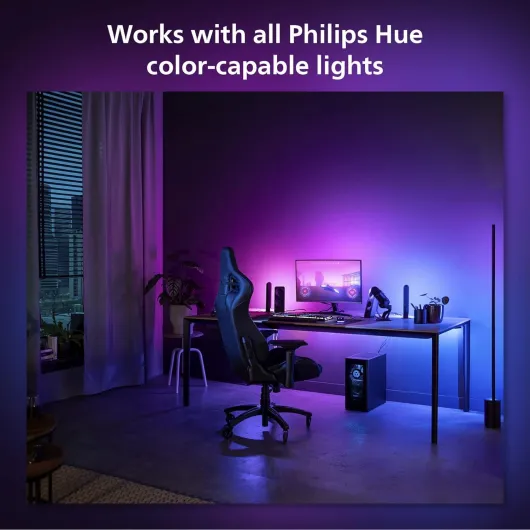
Overall, for gaming and movie nights, the performance is honestly one of the strengths here. No flicker, no weird colour shifts, and no obvious delay. If you already have Hue bulbs in the room, syncing everything together creates a pretty cohesive setup. But again, you’re paying for that comfort. If you just want a basic static bias light behind your monitor, this is overkill and too expensive for what you’ll actually use.
What you actually get in the box and how it all hooks up
Out of the box, this bundle is pretty straightforward. You get: the Play Gradient PC lightstrip cut to size for 32–34 inch monitors, the Hue Bridge, a power supply, and the plastic mounting brackets that clip onto the back edge of your monitor. No extra sync box, no remote, nothing fancy. Everything is clearly Philips Hue branded, so it doesn’t feel cheap or generic, but it’s not some premium unboxing experience either. It’s just packed in a functional way that protects the strip.
The main idea is simple: the strip sticks (well, clips) around the back edges of your monitor, and the colours change based on what’s on your screen. You control it via the Philips Hue app (for general light control) and the Hue Sync app on your PC (for real-time screen syncing). The Bridge plugs into your router via Ethernet and basically acts as the brain for everything. No Bridge, no real smart features. That’s the first thing to know: you’re locked into the Hue ecosystem from day one.
Setup for me took around 30–40 minutes from opening the box to having lights syncing with a game. Most of that time was spent fiddling with the brackets on the back of my curved ultrawide and going through app pairing. Once everything was paired, it was pretty smooth: the app found the strip quickly, firmware updated once, and then it stayed stable. No random disconnects so far, which is more than I can say for some cheaper RGB kits I’ve tried.
Overall, in terms of presentation and first contact, it feels like a proper consumer product, not a DIY kit. But you should be aware of the trade-off: you’re buying into the Hue system. That means a more polished experience, but also more cables (Bridge + power) and more money if you want to expand later. If you hate hubs or just want a single USB-powered strip, this is already not the right product for you.
Pros
- Very smooth gradient lighting with strong colours and good brightness
- Reliable screen sync via the Hue Sync PC app with low visible latency
- Integrates well with other Philips Hue lights and scenes through the Bridge
Cons
- High price compared to simpler LED strips and non-Hue alternatives
- Requires a Hue Bridge and network connection at all times, adding cables and complexity
- Mounting brackets can be tricky on curved or non-standard monitor backs and the size is not flexible
Conclusion
Editor's rating
After using the Philips Hue Play Gradient PC Lightstrip with the Hue Bridge for a while on my 34-inch monitor, my conclusion is pretty straightforward: it’s a well-made, polished product that does what it claims, but you definitely pay for the brand and the ecosystem. The light quality, brightness, and gradient effects are genuinely good, and the sync with games and movies works smoothly once it’s set up. As a bias light for general work and browsing, it’s also comfortable and helps with eye strain when tuned to softer scenes.
On the downside, the whole setup depends on the Hue Bridge and your network, which adds cables, cost, and a bit of complexity. The mounting brackets can be fiddly on non-standard or curved monitors, and the strip is basically locked to the 32–34 inch size range, so it’s not very flexible if you change displays often. It’s also simply more expensive than most alternatives, especially if you’re not already into Hue.
I’d recommend this to people who already use Hue lights, care about a clean and reliable experience, and actually want proper screen-sync effects for gaming and movies. If you’re the type who enjoys tweaking lighting scenes and having everything controlled from one app, this fits nicely. If you just want a cheap glow behind your monitor or hate the idea of a hub and extra software, you’re better off with a basic LED strip or a cheaper brand, even if it’s a bit rougher around the edges.
![L510E Smart Bulb, Smart WiFi LED Light, E27, Works with Amazon Alexa(Echo and Echo Dot), Google Home, Dimmable Soft Warm White, No Hub Required [Energy Class F] 1 Pack](https://www.smart-light-guru.com/storage/939180/conversions/71WGq8rBN-L._AC_SL1500_-medium.webp)