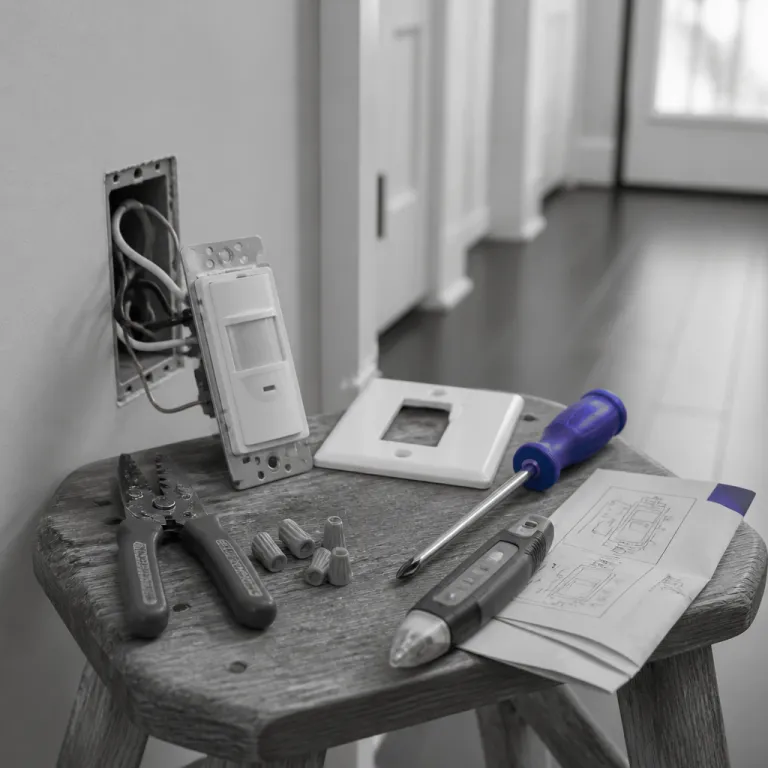
What an occupancy sensor wall switch actually does in your home
An occupancy sensor switch replaces a standard wall switch and turns the light on automatically when it detects motion. In practical terms, the sensor uses one or more motion-detection technologies to read movement and then cuts power after a set time when the room is empty, which reduces wasted energy and improves everyday comfort. A modern sensor switch can also work in vacancy mode, where you turn the light on manually but the motion sensor turns it off for you.
The core of every occupancy sensor is either a passive infrared device, often called a PIR motion sensor, or an ultrasonic sensor that listens for tiny sound changes. Many higher end sensor switches now use dual technology, combining PIR motion detection with ultrasonic sensing, so the device is less likely to miss subtle movement or trigger falsely from hallway traffic. When you compare these dual technology designs with basic PIR motion sensors, you usually gain better accuracy in tricky spaces such as bathrooms, laundry rooms, or home offices with partial walls.
| Sensor type | Best room types | Typical wiring / neutral needs | LED and dimmer compatibility notes |
|---|---|---|---|
| PIR motion sensor wall switch | Closets, pantries, small bathrooms, straightforward hallways | Single pole hot, load, ground; many models now expect a neutral conductor | Generally works well with most LED lamps when minimum load is met and dimming is not required |
| Ultrasonic or dual technology wall switch | Home offices, kids’ playrooms, irregular layouts, rooms with partial walls | Single pole wiring plus neutral wire for the added electronics in most designs | Better at detecting small movements; check LED compatibility lists carefully when pairing with dimmers |
| Ceiling mount occupancy sensor | Garages, large open plan areas, long corridors, shared workspaces | Often needs a junction box, line and neutral conductors, and sometimes a separate relay pack | Excellent coverage; must match ballast or driver type and follow manufacturer guidance for low-wattage LED loads |
Key technologies behind motion sensing and vacancy modes
To understand why one occupancy sensor switch feels smarter than another, you need to look at the sensing technologies inside. A basic PIR motion sensor reads changes in infrared heat across its lens, so it reacts strongly when a person walks into the room but can miss very small movements when someone sits still at a desk, which matters in home offices or study areas. Dual technology occupancy sensor switches add ultrasonic sensing that sends out high frequency sound waves and listens for reflections, which helps them catch subtle hand movements or slight posture shifts.
Manufacturers such as Leviton, Lutron, and others offer both PIR-only models and dual technology sensor switches, and the price difference usually reflects the added electronics and tuning. When you compare a simple PIR motion occupancy sensor with a dual technology version in a long hallway, you often notice that the dual sensor switch avoids false triggers from air vents or pets while still catching people at the far end. In smaller rooms like closets, a single PIR motion sensor wall switch is often sufficient, especially when the lens is aimed correctly and the time delay is set conservatively.
Vacancy control is another important concept, because some building codes now prefer vacancy style operation in certain rooms. In vacancy mode, the wall switch must be pressed manually to turn the light on, but the occupancy or vacancy sensor turns it off automatically after the room is empty, which balances safety with energy savings. If you are planning a broader smart lighting upgrade with dimmers and scenes, it is worth reading a detailed guide such as this one on how a kit dimmer transforms everyday smart lighting at home, because pairing dimming with an occupancy sensor switch can dramatically change how a space feels.
Wiring, neutral requirements, and safety for sensor switches
Behind the faceplate, an occupancy sensor switch is still an electrical device that must be wired correctly to work safely. Most modern sensor switches are designed for a standard single pole circuit, where one wall switch controls one group of lights, and they usually require a hot wire, a load wire, and a ground wire connection. Many newer designs also need a neutral conductor for their electronics, which is why you often see the phrase switch neutral or neutral wire required in product descriptions.
In older homes, the neutral wire may not be present in the wall box, which complicates installing a smart sensor switch with advanced features. Some manufacturers, including Leviton, offer specific occupancy sensor models that do not have a neutral wire required, and these can be a better fit when you cannot easily pull new cable through the wall. With LED lighting, however, non-neutral designs can sometimes cause faint glow or flicker at very low wattages, so checking the compatible lamp types and minimum load ratings is important before you buy.
Regardless of brand, every occupancy sensor wall switch must match the circuit voltage and follow local electrical codes. Typical residential sensor switches are rated for standard mains voltage and specify whether a separate ground wire connection is required, which is essential for safety and for the motion sensor electronics to function reliably. When in doubt about any wire color or whether a conductor is actually neutral or ground, especially in older single pole circuits or unusual multiway configurations, consulting a licensed electrician is far safer than guessing behind the wall.
Choosing between ceiling mount and wall mount occupancy sensors
Not every room is best served by a wall switch based occupancy sensor, and sometimes a ceiling mount design makes more sense. A ceiling mount occupancy sensor sits above the space and can see motion in all directions, which is useful in large open plan rooms, garages, or long corridors where a single wall switch sensor might leave blind spots. When you compare ceiling mount sensors with wall switch sensors, the main trade off is usually between coverage flexibility and installation complexity.
Wall mounted sensor switches are easier to retrofit, because they replace an existing switch and use the same hot wire, load wire, neutral wire, and ground wire connections already present in the box. A ceiling mount occupancy sensor often needs a separate junction box, extra cable runs, and sometimes a relay pack if the sensor voltage rating does not match the lighting circuit, which can raise costs. For many homeowners, a single pole sensor switch in a standard decorator style is the most practical compromise, especially when the wall switch location already gives a clear view of the main motion paths.
In some layouts, combining a ceiling mount sensor with a wall switch based occupancy sensor can provide layered coverage. For example, a dual technology ceiling sensor might handle broad detection in a large office, while a vacancy style wall switch near the door ensures the light can always be turned on manually when needed. Thinking about how people actually move through the room, including where they pause and where they sit, is more important than simply choosing between wall and ceiling mount hardware.
Design, color choices, and how occupancy sensors fit smart homes
For many people, the visual design of an occupancy sensor switch matters almost as much as its technical features. Most residential models come in a neutral white finish, and pairing a matching lens with a coordinated wall plate helps the device blend into the wall, which keeps attention on the room rather than the hardware. Some brands offer multiple colors beyond white, but neutral tones remain the default in many homes because they match existing switches and outlets.
Leviton and similar manufacturers often use the Decora style rectangular opening, so a Decora vacancy or occupancy sensor wall switch can share the same plate style as dimmers and standard switches. This consistency makes it easier to compare different switches visually and to keep a hallway or kitchen looking coherent, even when some devices are standard switches and others are advanced sensor switches. When you plan a renovation, it is worth mapping which locations will use a simple single pole switch, which will use a motion sensor switch, and which might benefit from a smart dimmer with wireless control.
Integrating occupancy sensors into a broader smart home platform can unlock extra value. A central smart home hub that supports motion sensors and wall switches can, for example, trigger a scene when a specific sensor device detects occupancy, such as turning on pathway lights and adjusting a thermostat. If you are exploring this route, looking at a dedicated smart home control panel compatible with thousands of devices with Alexa can help you learn how an occupancy sensor switch fits into a larger ecosystem rather than acting as a stand alone gadget.
Practical buying checklist for occupancy sensor switches and sensors
When you stand in front of a shelf full of occupancy sensor switches, the options can feel overwhelming. A structured checklist helps you compare models logically, starting with whether you need a single pole wall switch replacement or a more complex multiway configuration for staircases and long corridors. Next, decide whether a basic PIR motion sensor is enough or whether a dual technology sensor switch with ultrasonic support is justified by the room size and usage pattern.
After technology, check the electrical specifications carefully, including voltage rating, whether a neutral wire is required, and how the ground wire must be connected. Many packaging labels now state clearly whether a switch neutral connection is mandatory, which is crucial in older homes where the neutral wire may not be present in the wall box, and this can immediately narrow your choices. Pay attention to whether the device supports both occupancy and vacancy motion modes, because having both options in one sensor unit gives you flexibility if building codes or personal preferences change later.
Finally, look at the physical design, including color options, labeling, and whether the lens area is large enough for reliable detection without dominating the wall visually. Brands such as Leviton often publish detailed coverage diagrams for their sensors, showing how far the motion sensor can see at different mount heights, which is invaluable when planning ceiling mount or wall mount occupancy coverage. Taking the time to learn these details before buying usually leads to a quieter, more reliable lighting experience, where the occupancy sensor switch simply works in the background and you stop thinking about the light switch entirely.
Key figures on occupancy sensors and smart lighting
- According to the U.S. Department of Energy (see the DOE Energy Saver guidance on lighting controls and occupancy sensors), occupancy sensors can reduce lighting energy use in some spaces by up to about 30 %, especially in intermittently used rooms such as offices, classrooms, and restrooms, which highlights the impact of a correctly placed occupancy sensor switch.
- Field studies compiled by the Lawrence Berkeley National Laboratory (LBNL) in its summaries of lighting control savings and occupancy-based strategies report that vacancy style controls, where users manually turn lights on but sensors turn them off, often achieve around 20 % or more additional savings compared with manual switching alone, which supports choosing vacancy motion modes in residential bedrooms and living rooms.
- Data from the DesignLights Consortium (DLC), summarized in its networked lighting controls research and technical reference materials, indicate that dual technology sensors can cut false off events by more than half compared with PIR only devices in complex spaces, which explains why dual technology sensor switches are recommended for open plan offices and classrooms.
- Market research from firms such as Mordor Intelligence, in their smart lighting market outlooks and global forecasts, reports that smart lighting, including sensor based controls, is growing at a compound annual rate above 15 %, driven by falling LED prices and stricter building energy codes that increasingly reference occupancy sensor requirements.
FAQ about occupancy sensor switches and motion sensors
Do I need a neutral wire for an occupancy sensor switch ?
Many modern occupancy sensor switches require a neutral wire to power their electronics continuously, especially smart models with wireless connectivity. Some designs, including certain Leviton units, are engineered to work without a neutral wire by leaking a tiny current through the load, but they may have compatibility limits with LED lamps. Always check whether a neutral wire is required on the product label before purchasing for an older home.
What is the difference between occupancy and vacancy modes ?
In occupancy mode, the sensor turns the light on automatically when it detects motion and turns it off after the room is empty, which maximizes convenience. In vacancy mode, you turn the light on manually at the wall switch, but the motion sensor or vacancy motion sensor turns it off automatically after a delay, which can reduce unintended activations. Some sensor switches support both modes so you can choose room by room.
Where should I mount an occupancy sensor for best performance ?
For wall switch sensors, the ideal mount location is usually near the main entry door with a clear line of sight to the primary activity area, avoiding obstructions such as tall furniture. Ceiling mount occupancy sensors work best when placed near the center of the room at the recommended height, which maximizes coverage and reduces blind spots. Always follow the manufacturer’s diagrams for sensor wall or ceiling mount placement, because each lens pattern is different.
Can occupancy sensor switches work with LED lights and dimmers ?
Most current occupancy sensor switches are designed to be compatible with LED loads, but you must respect the minimum and maximum wattage and the specified voltage range. When combining a motion sensor switch with a dimmer, it is often better to use a dedicated sensor dimmer or a matched kit from the same brand to avoid flicker or dropout. Checking the compatibility lists from manufacturers such as Leviton helps ensure that the sensor, switches, and light sources work together reliably.
Are dual technology sensors worth the extra cost at home ?
Dual technology sensors combine PIR motion detection with another sensing method, usually ultrasonic, to reduce missed detections and false offs in complex spaces. They are particularly valuable in large rooms, irregular layouts, or home offices where people may sit still for long periods, because a single PIR motion sensor might not always see subtle movements. In small, straightforward rooms such as closets or pantries, a simpler single technology occupancy sensor switch is often sufficient and more cost effective.