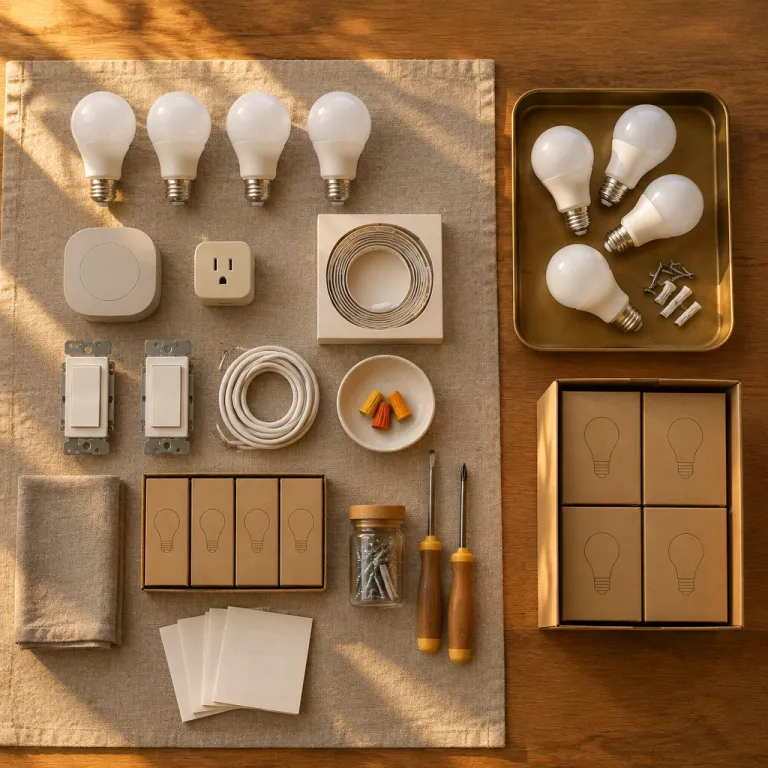
How far a 200 dollar smart lighting starter kit really goes
A 200 dollar smart lighting starter kit budget can cover more of your home than you think. When you allocate that smart lighting starter kit budget deliberately, you can light a living room, a bedroom, and a hallway with smart bulbs and one reliable hub or a solid hub free setup. That same smart lighting starter kit budget also leaves room for one smart plug or switch so your first smart devices feel coherent rather than like scattered gadgets.
The priority is simple but powerful, and it shapes every smart light decision you make at this price point. Start with the room where you spend the most time, usually the living room, then move to the bedroom, and only then add a hallway or entry light that keeps you safe at night and makes the house feel alive when you come home. Kitchen and bathroom lights often need special bulb shapes or a wired switch, so they are rarely the best smart targets for a first smart lighting starter kit budget when money is tight.
In practice, that means planning for two or three smart bulbs in the living room, one or two smart bulbs in the bedroom, and a single smart plug or smart led compatible switch in the hallway. You then decide whether a dedicated hub such as a Philips Hue Bridge or a Nest Hub style screen is worth part of the budget, or whether Wi Fi smart bulbs that talk directly to amazon alexa or google assistant are enough for now. The goal is not to chase every color feature or every app gimmick, but to build a smart lighting backbone that feels stable, fast, and easy for everyone in the house to use.
Choosing one ecosystem and one hub before you buy anything
The biggest mistake first time buyers make is mixing ecosystems before they understand how a hub and smart assistant actually work together. At a 200 dollar smart lighting starter kit budget, you should commit to one platform, whether that is Philips Hue with its dedicated hub, Govee Wi Fi smart led bulbs that lean on the Govee app, or a Nest Hub centered setup that uses google assistant scenes. When you scatter money across random bulbs from amazon, you end up with three apps, clashing color temperature controls, and no single place to adjust brightness color in the evening.
If you already use amazon alexa, then building around that assistant keeps things simple, because most smart bulbs and smart lights now advertise explicit compatibility with amazon alexa and alexa google style voice commands. A compact Echo speaker can act as a de facto hub for many Wi Fi smart devices, so your smart bulb or smart bulbs can join routines without extra hardware. This is also where you should start planning lighting routines that go beyond basic on and off, using guides such as advanced Alexa lighting routines worth setting up first to squeeze more value from each light bulb.
Households already invested in Nest hardware may prefer a Nest Hub display as the central screen for smart lighting and other smart devices. In that case, you want smart lights and smart bulbs that clearly state compatibility with google assistant and Nest, so you can adjust white color warmth or color ambiance scenes from the same voice assistant. Whatever you choose, the best smart approach at this budget is to avoid running Philips Hue, Govee, and random bulb amazon specials side by side, because app fragmentation quietly kills the convenience that smart lighting is supposed to deliver.
Living room first: where your smart lighting budget works hardest
The living room is where a smart lighting starter kit budget earns its keep every single night. Two or three smart bulbs in the main fixtures can shift from bright white for cleaning to warm white color for movies, and that change alone makes the space feel more expensive than any new lamp. If you pick the best smart bulbs for this room, you also set the tone for every later smart light you buy.
For a hub based system, a Philips Hue White Ambiance A19 light bulb is still the reference point, because it balances brightness, reliability, and smooth dimming better than most budget smart led options. A three pack of Philips Hue White Ambiance bulbs plus the Philips Hue Bridge hub often lands around half of a 200 dollar budget, leaving enough for bedroom and hallway coverage. If you prefer to skip a hub, then a set of Wi Fi smart bulbs from Govee or another reputable brand, ideally rated around 800 lumens per bulb, can give similar brightness color performance while relying on the brand app and your voice assistant instead of Zigbee.
Whichever route you take, focus on tunable white rather than full color ambiance for these first living room lights. Paying extra for every color under the sun sounds fun, but most people settle into a few white color presets after the novelty fades, as detailed in this analysis of top smart LED light bulbs and when color is worth it. Your smart lighting starter kit budget stretches further when you reserve color bulbs for a later upgrade and put the money into more coverage, better dimming, and a stable hub or assistant link instead.
Bedroom and hallway: comfort, safety, and the wall switch problem
Once the living room feels right, your remaining smart lighting starter kit budget should go to the bedroom and a hallway or entry. One or two smart bulbs in bedside lamps can handle gentle wake ups, late night reading, and low brightness color scenes that do not blast your eyes at midnight. A single smart plug or compact smart switch in the hallway then gives you a safety light that turns on automatically when you arrive or when motion is detected.
In the bedroom, tunable white smart bulbs again beat full color for most people, because the real win is shifting color temperature from cool in the morning to warm at night. A Philips Hue White Ambiance bulb, a Govee tunable white bulb, or a similar smart bulb from bulb amazon listings that clearly state compatibility with amazon alexa and google assistant will all do the job. The best smart feature here is not rainbow effects, but the ability to say a quick command to your assistant or tap the app once and have every light bulb in the room glide down to a soft warm white color before sleep.
This is also where the hidden cost of smart lighting shows up, because a smart light is useless when someone flips the wall switch off. You need a household rule that main switches stay on so the hub, app, and assistant can still reach the bulbs, or you invest later in smart switches that keep power flowing while controlling the lights digitally. For a 200 dollar starter kit, plan on behavior change first and hardware fixes later, and accept that one hallway lamp on a smart plug is often easier for guests than a fully rewired smart lighting circuit.
What to skip at first: color bulbs, outdoor lights, and too many apps
With only a 200 dollar smart lighting starter kit budget, restraint is your best friend. Full color smart bulbs, outdoor smart lights, and fancy accent strips all look tempting on amazon, but they usually deliver less day to day value than a few extra white smart bulbs in the rooms you actually use. The smartest buy is often a plain looking light bulb that nails brightness, color temperature control, and reliability with your chosen hub or assistant.
Color capable smart led bulbs have their place, especially in a media room or behind a TV, but they cost more and encourage you to chase scenes you will rarely use. Many long term testers report that after a few weeks, they leave their color ambiance bulbs on warm white color almost all the time, which means they paid extra for a feature that sits idle. A detailed breakdown of tunable white versus full color, including when that extra cost makes sense, is available in this guide on whether full RGB color is worth the premium.
Outdoor smart lights and complex smart devices such as wired switches or in wall dimmers also belong on the later list, not in your first starter kit. They often require more electrical work, more careful planning of hub range, and more troubleshooting with compatibility between the app, the assistant, and the existing wiring. For now, keep your smart lighting starter kit focused on indoor bulbs, one stable hub or hub free ecosystem, and a small number of apps so that every smart light feels like part of a single, predictable system.
Fine tuning brightness, color temperature, and routines for daily life
Once your initial smart lighting starter kit is installed, the real value comes from tuning brightness color and color temperature to match your routines. A living room smart light that runs at 100 percent cool white all evening will feel harsh, while the same light bulb at 40 percent warm white color makes the room feel calm. Smart bulbs and smart lights give you that control, but only if you spend a few evenings adjusting scenes in the app or through your assistant.
Start by setting daytime scenes around 4000 to 5000 Kelvin for focus, then shift to 2700 to 3000 Kelvin in the evening for relaxation, using your hub or voice assistant to automate the change. Most Philips Hue, Govee, and similar smart led bulbs expose these color temperature settings clearly, and you can save them as presets that work across multiple bulbs. The best smart setups also tie these scenes to sunrise and sunset, so your smart devices quietly adjust the lighting without you opening an app every night.
Voice control through amazon alexa or google assistant is the final layer that makes the system feel natural. Simple phrases that dim the living room lights, warm up the bedroom light, or turn off every smart bulb at once are more important than complex color ambiance scenes. When your family can say one short command and have every relevant light respond, your 200 dollar smart lighting starter kit budget stops feeling like a gadget experiment and starts feeling like part of the house.
Where to go after the first month: your next 100 dollars
After a month of living with your first smart lighting starter kit, you will know which rooms and habits matter most. Maybe the hallway smart plug is the hero, or perhaps the bedroom smart bulbs with gentle color temperature shifts make the biggest difference. That experience should guide how you spend the next 100 dollars rather than any marketing claim about the best smart gadget.
If you started with tunable white only, your next step might be a single color ambiance bulb behind the TV or in a corner lamp, where playful color actually gets used. Another strong upgrade is a smart switch on the most abused circuit, often the main living room light, which solves the wall switch problem for guests while keeping your hub and assistant in control. In both cases, stay inside the same ecosystem, whether that is Philips Hue with its bridge, a Govee app based setup, or a Nest Hub and google assistant combination, so every new light bulb or smart device joins the same routines.
Some households will instead choose to extend coverage into the kitchen or bathroom with smart led bulbs that match the existing fixtures. Here, pay close attention to brightness color ratings in lumens and to moisture or heat limits, especially above showers or stoves. Whatever you choose, keep your smart lighting starter kit budget mindset even as you expand, adding only the bulbs and lights that solve a real problem instead of chasing every new bulb amazon listing that promises more features than you will ever use.
Key figures about smart lighting adoption and performance
- Market research from firms such as Statista shows that smart lighting is now present in more than one quarter of United States smart homes, a share that has roughly doubled over the last five years as prices for each smart bulb and smart led strip have fallen.
- Typical A19 smart bulbs from major brands such as Philips Hue or Govee draw around 8 to 10 watts while delivering roughly 800 lumens, which replaces a traditional 60 watt incandescent light bulb and can cut energy use for that socket by more than 80 percent.
- Surveys of smart home owners consistently find that living rooms and bedrooms are the first two rooms to receive smart lights, with more than 60 percent of respondents reporting at least one smart light in the main living area before they add any outdoor or bathroom smart devices.
- Many smart lighting systems now support dimming down to 1 or 2 percent brightness, which is significantly lower than most older wall dimmers and allows for true night light levels in hallways and bedrooms without installing separate low power fixtures.
- Compatibility with voice assistants has become nearly universal in this category, with the majority of new smart bulbs launched by major brands explicitly supporting amazon alexa and google assistant out of the box, reducing the need for proprietary remotes or extra hubs.
FAQ: smart lighting starter kits and 200 dollar budgets
Is 200 dollars really enough for a whole house smart lighting starter kit budget ?
A 200 dollar smart lighting starter kit budget is enough to cover a typical living room, a bedroom, and a hallway or entry with smart bulbs and one smart plug or switch. You will not light every room, but you will transform the spaces you use most. That focused coverage is usually more satisfying than spreading cheaper bulbs thinly across the entire home.
Should I choose Philips Hue with a hub or Wi Fi smart bulbs without one ?
Philips Hue with a dedicated hub offers excellent reliability, fast response, and strong app support, but the bridge and bulbs cost more. Wi Fi smart bulbs from brands such as Govee can be cheaper and do not need a separate hub, though they rely heavily on your router and may crowd your network if you add many lights. At a 200 dollar budget, either path works, but you should pick one ecosystem and stick with it.
Do I need color bulbs in my first smart lighting starter kit ?
Most first time buyers get more value from tunable white bulbs that adjust color temperature than from full color bulbs. White color control lets you shift from cool, energizing light to warm, relaxing light, which affects comfort every day. Color ambiance bulbs are better as a later upgrade for one or two accent fixtures where you will actually use colored scenes.
How do I stop people from turning off the wall switch and killing power to smart bulbs ?
The simplest approach is to agree that certain switches stay on and to use the app, hub, or voice assistant to control those lights. If that fails, your next investment should be a smart switch or dimmer on the most important circuit, which keeps power flowing to the bulbs while still letting people tap a physical control. Some ecosystems also offer wireless remotes that stick over the old switch and talk to the hub instead of cutting power.
What should my next 100 dollar upgrade be after the starter kit ?
After a month of use, review which smart lights you rely on most and upgrade around those habits. Many people add a smart switch to fix the most problematic wall switch, or they introduce a single color bulb in a media area for occasional mood lighting. Others extend coverage into the kitchen with bright smart led bulbs that match existing fixtures while staying inside the same ecosystem and assistant they already use.