
What is z wave and z wave plus in smart lighting
How Z Wave Technology Powers Smart Lighting
Z Wave is a wireless communication protocol designed specifically for smart home automation. It enables devices like light switches, dimmer switches, sensors, and controllers to communicate with each other over a secure, low-energy network. Z Wave technology is widely used in smart homes for its reliability, security, and ability to connect a wide range of devices, including motion sensors, temperature humidity sensors, water leak detectors, and wall switches.
One of the key strengths of Z Wave is its mesh network structure. Each device, such as an Aeotec switch or Ecolink sensor, acts as a repeater, extending the network's range and ensuring commands reach even distant devices like a garage door controller or a water leak sensor in the basement. This mesh approach is especially valuable in larger homes or spaces with thick walls, where wireless signals can struggle to reach every corner.
Evolution to Z Wave Plus and Beyond
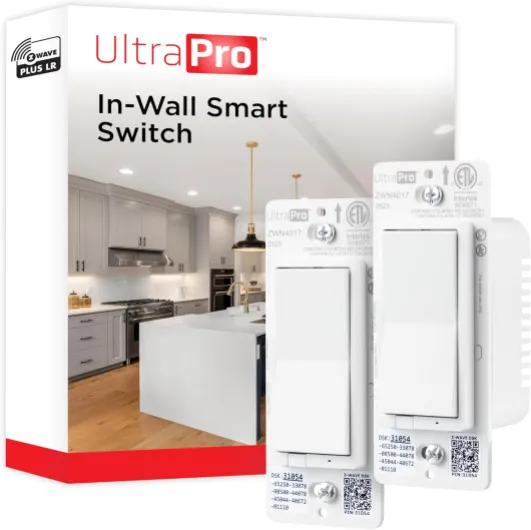
Z Wave Plus, also known as Gen 5 or 500 series, is an upgraded version of the original Z Wave technology. It brings improvements in range, battery life, and security. Devices labeled as Z Wave Plus, such as the Ecolink Wave Plus motion sensor or Aeotec range extender, offer longer range and more robust communication, making them ideal for critical applications like door sensors or water leak detectors. The latest advancements, including Z Wave Long Range, further boost coverage and device capacity, supporting even larger smart lighting networks.
With Z Wave and Z Wave Plus, users can automate and control a variety of smart devices, from dimmer switches to multi sensors, all within a secure and energy-efficient ecosystem. The Z Wave Alliance, the organization behind the standard, ensures that certified devices from different brands work seamlessly together, supporting the vision of truly connected smart homes.
For those comparing Z Wave to other smart lighting technologies, it's helpful to explore the benefits and challenges of Zigbee smart lighting as well.

Key differences between z wave and z wave plus
Comparing Generations of Z-Wave Technology
When exploring smart lighting for smart homes, understanding the differences between Z-Wave and Z-Wave Plus is essential. Both technologies are part of the Z-Wave Alliance and are widely used in wireless automation, but they offer distinct features that impact device performance, range, and compatibility.
- Range and Reliability: Z-Wave Plus, sometimes called Gen 5 or Gen Wave, offers a longer range than the original Z-Wave. This means devices like wall switches, dimmer switches, and motion sensors can communicate over greater distances, making it easier to control lights in larger homes or through multiple walls. Z-Wave Plus also improves network reliability, reducing the chances of dropped signals between devices such as a garage door controller or a water leak sensor.
- Battery Life: One of the key upgrades in Z-Wave Plus is enhanced battery life. Devices like temperature humidity sensors, multi sensors, and leak sensors can operate longer without needing frequent battery changes, which is especially useful for sensors placed in hard-to-reach areas.
- Security Enhancements: Z-Wave Plus introduces stronger security protocols, making it harder for unauthorized users to access your smart lighting network. This is particularly important for devices controlling entry points, like a smart door lock or an Ecolink Wave sensor.
- Backward Compatibility: Both Z-Wave and Z-Wave Plus devices can work together within the same network. However, Z-Wave Plus devices offer additional features when paired with other Plus devices, such as improved range and faster communication. For example, using a Z-Wave Plus range extender can boost the signal for older devices, but the full benefits are realized with a complete Plus setup.
- Device Support and Ecosystem: The Z-Wave ecosystem includes a wide variety of devices, from Aeotec smart switches to Ecolink water leak sensors. Z-Wave Plus expands this ecosystem with more advanced sensors and switches, supporting automation scenarios like temperature humidity monitoring or motion-activated lighting control.
For a deeper dive into how Bluetooth-enabled lighting compares to Z-Wave and Z-Wave Plus, you can check out this guide on Bluetooth-enabled lighting.
| Feature | Z-Wave | Z-Wave Plus |
|---|---|---|
| Range | Up to 100 feet | Up to 150 feet (long range) |
| Battery Life | Standard | Extended |
| Security | Basic | Enhanced (S2 security) |
| Device Support | Wide | Wider, with advanced features |
| Compatibility | Works with Z-Wave Plus | Backward compatible |
Choosing between Z-Wave and Z-Wave Plus depends on your needs for range, battery life, and security. For most new smart lighting installations, Z-Wave Plus offers clear advantages, especially in larger or more complex smart homes.
Benefits of using z wave and z wave plus for smart lights
Why Z-Wave and Z-Wave Plus Matter for Smart Lighting
Choosing the right technology for your smart lighting system can make a big difference in your daily experience. Z-Wave and Z-Wave Plus offer a range of benefits that help smart homes become more efficient, secure, and reliable. Here’s what stands out when using these technologies for smart lights and related devices:
- Reliable Wireless Network: Z-Wave and Z-Wave Plus create a robust mesh network, allowing each device—like a wall switch, dimmer switch, or motion sensor—to relay signals. This means your smart lights and sensors can communicate even in larger homes, reducing dead zones and improving overall control.
- Extended Range and Coverage: Z-Wave Plus, sometimes called Gen 5 or Gen Wave, offers longer range compared to earlier Z-Wave series. With range extenders and devices like the Aeotec Range Extender, you can cover more space, from your garage door to a basement water leak sensor.
- Improved Battery Life: Many Z-Wave Plus devices, including multi sensors and temperature humidity sensors, are optimized for low power consumption. This means longer battery life for wireless devices like Ecolink Wave motion sensors or leak sensors, reducing maintenance and costs.
- Enhanced Security: Security is a top priority for smart homes. Z-Wave Plus supports advanced encryption, helping protect your network and devices—such as smart switches and door sensors—from unauthorized access.
- Interoperability and Automation: The Z-Wave Alliance ensures that certified devices, whether a smart light switch or a water leak sensor, work together seamlessly. This makes it easier to automate lighting based on triggers from motion sensors, door sensors, or even temperature humidity readings.
- Wide Device Ecosystem: There’s a broad selection of Z-Wave and Z-Wave Plus products, including Ecolink, Aeotec, and other brands. You can build a comprehensive smart lighting system with dimmer switches, wall switches, range extenders, and more.
For a closer look at how smart lighting technology can transform your living environment, check out this guide on smart lighting for home transformation.
Compatibility considerations for smart light devices
Ensuring Your Devices Work Together
When building a smart lighting system with Z-Wave or Z-Wave Plus, compatibility is a key concern. Not every smart device, switch, or sensor will work seamlessly with every network or hub. Here are some important points to consider:
- Device Generation: Z-Wave Plus (sometimes called Gen 5 or Gen Wave) offers improved range, battery life, and security compared to the original Z-Wave technology. However, Z-Wave and Z-Wave Plus devices are generally backward compatible. This means you can use a Z-Wave Plus dimmer switch or wall switch with older Z-Wave sensors or controllers, but you may not get all the benefits of the newer technology unless your network supports it.
- Network and Hub Support: Make sure your smart home hub or controller supports both Z-Wave and Z-Wave Plus devices. Some hubs, like those from Aeotec or Ecolink, are designed to handle mixed networks, but always check the specifications.
- Device Types: Z-Wave technology covers a wide range of smart devices, including motion sensors, humidity sensors, temperature humidity sensors, water leak detectors, multi sensors, garage door controllers, and range extenders. Not all hubs support every device type, so verify compatibility before purchasing.
- Series and Alliance: Devices certified by the Z-Wave Alliance are tested for interoperability. Look for the Z-Wave or Z-Wave Plus logo and check the device’s series (such as 500 series or 700 series) for the best compatibility and performance.
- Wireless Range: Z-Wave Plus and Z-Wave Long Range devices offer extended wireless coverage, which is crucial for larger smart homes or for devices like water leak sensors in basements or garage door controllers far from the main hub. Range extenders can help bridge gaps in your network.
- Security Features: Newer Z-Wave Plus devices often include enhanced security protocols. If security is a priority, especially for door locks or critical automation, ensure your hub and devices support the latest security standards.
Practical Tips for Smart Lighting Compatibility
- Stick to reputable brands like Aeotec, Ecolink, and other Z-Wave Alliance members for better reliability.
- Before buying, check the compatibility lists provided by your hub manufacturer.
- Consider battery life for devices like motion sensors and leak sensors, especially in hard-to-reach areas.
- If you plan to use advanced features, such as automation or remote control, confirm that your chosen devices and hub support these functions.
By paying attention to these compatibility factors, you can build a robust, reliable smart lighting system that integrates seamlessly with other smart home devices, from light switches to water sensors and beyond.
How to set up a z wave or z wave plus smart lighting network
Preparing Your Smart Lighting Network
Before you start connecting devices, it’s important to plan your Z-Wave or Z-Wave Plus network for your smart home. Consider the layout of your space, the range of your devices, and the types of smart lights and sensors you want to control. Z-Wave technology is known for its reliable wireless mesh network, but the placement of each device, such as a wall switch, dimmer switch, or motion sensor, can affect performance and range.
Adding Devices to Your Z-Wave Network
Begin by setting up your Z-Wave hub or controller. This device acts as the brain of your smart lighting system, allowing you to add and manage other devices like light switches, multi sensors, and range extenders. Most hubs have a simple process for including new devices:
- Put the hub in inclusion mode (refer to your hub’s manual).
- Activate the pairing mode on your smart device, such as an Aeotec switch, Ecolink sensor, or water leak detector.
- Wait for the hub to confirm the device has been added to the network.
Repeat this process for each device, including temperature humidity sensors, garage door controllers, and battery-powered devices. Z-Wave Plus and Z-Wave Long Range devices offer improved range and battery life, making them ideal for larger homes or areas with thick walls.
Optimizing Device Placement and Network Range
To ensure strong communication between devices, place powered devices like smart switches and dimmers throughout your home. These act as repeaters, extending the mesh network and improving reliability. For areas far from the hub, consider using a range extender or placing a powered device nearby. Wireless sensors, such as Ecolink wave motion sensors or water leak sensors, should be within range of at least one powered device for optimal performance.
Configuring Automation and Control
Once your devices are connected, use your hub’s app to create automation rules. For example, set a motion sensor to turn on a light switch when movement is detected, or configure a humidity sensor to trigger a fan. Z-Wave technology supports a wide range of automation scenarios, from simple schedules to complex scenes involving multiple devices and sensors.
Security and Device Management
Modern Z-Wave Plus devices include enhanced security features. Always update your hub and devices to the latest firmware to benefit from improved security and performance. Regularly check the battery life of wireless devices and replace batteries as needed. The Z-Wave Alliance recommends periodic network health checks to ensure all devices are communicating effectively.
Troubleshooting Tips
- If a device isn’t responding, try excluding and re-including it in the network.
- For range issues, add a range extender or reposition devices.
- Check for interference from other wireless devices or thick walls.
- Consult your hub’s diagnostics tools for network mapping and device status.
With careful setup and ongoing management, your Z-Wave or Z-Wave Plus smart lighting network can deliver reliable, secure, and flexible control for your smart home.
Troubleshooting common issues with z wave and z wave plus smart lights
Common Problems and Practical Fixes
Even with advanced wave and wave plus technology, smart lighting systems can face issues. Here are some frequent problems users encounter with wave smart devices and practical steps to resolve them.
- Device Not Responding: If a smart light, dimmer switch, or wall switch stops responding, check the power source first. For battery-powered devices like a motion sensor or multi sensor, replace the batteries. For plug-in devices, ensure the outlet is working.
- Network Range Issues: Wave plus and wave long range devices are designed for extended coverage, but obstacles like walls or metal objects can reduce signal strength. Adding a range extender or another powered device, such as an aeotec switch, can help strengthen your network.
- Intermittent Connectivity: Devices dropping off the network may indicate interference or a weak mesh. Reboot your hub and perform a network heal to allow devices to re-establish optimal routes. This is especially helpful for larger smart homes with many devices.
- Sensor Not Triggering Automation: If a humidity sensor, temperature humidity sensor, or ecolink wave motion sensor is not triggering scenes, verify the automation rules in your control app. Also, check the placement of the sensor to ensure it detects motion or environmental changes effectively.
- Security Concerns: Wave plus includes enhanced security features. If you see security warnings, re-pair the device using secure inclusion mode. Always keep your hub firmware updated for the latest security patches.
- Water Leak or Garage Door Alerts Not Working: For devices like a water leak sensor or garage door controller, check for physical obstructions and ensure the device is within range. For battery-powered leak sensors, test regularly and replace batteries as needed.
- Device Compatibility: Not all gen wave devices work seamlessly with every hub. Check the wave alliance certification and your hub’s compatibility list before adding new devices.
Tips for Reliable Performance
- Place your hub centrally to maximize wireless coverage for all smart devices.
- Use powered devices like switches and dimmers to strengthen the mesh network.
- Regularly update device firmware for improved battery life and security.
- Label devices in your control app for easier troubleshooting and automation setup.
For more advanced troubleshooting, consult your device’s manual or the manufacturer’s support resources. Many issues can be resolved by resetting the device and re-adding it to your network, especially with newer series like wave plus long range or ecolink wave sensors.