Summary
Editor's rating
Is it worth the money compared to other smart locks?
Looks, keypad, and real-world handling
Battery life and what happens when power runs low
Build quality, long-term wear, and support issues
Daily performance, Z‑Wave behavior, and keypad reliability
What this lock actually does (and what it doesn’t)
Pros
- Reliable keypad operation and auto‑relock for everyday use
- Integrates well with many Z‑Wave hubs (SmartThings, Abode, Hubitat, etc.)
- Decent battery life and includes physical keys as backup
Cons
- Real capabilities depend heavily on your hub’s features (Ring is limited for scheduling)
- Some reports of touchscreen failures just after warranty with limited support options

Specifications
View full product page →| Brand | Yale |
A smart lock that finally got me to stop using keys
I’ve been running the Yale Touchscreen Deadbolt with Z‑Wave on my front door for a while now, and I’ll be straight: it’s not perfect, but it’s the first smart lock I’ve kept instead of ripping it off after a week. Before this, I tried a cheaper keypad deadbolt and one Bluetooth-only lock. One chewed through batteries, the other constantly failed to connect to my phone. This Yale lock sits in a decent middle ground: not the fanciest thing on the market, but it does the basic job properly most of the time.
The big selling point for me was Z‑Wave. My house already has a SmartThings hub and a couple of sensors, so I wanted something that plugs into that rather than yet another separate app. This model doesn’t use a Yale app at all; it expects you to already have a compatible hub like SmartThings, Ring, Hubitat, Abode, etc. If you don’t, you lose most of the “smart” side and you’re basically paying for an expensive keypad lock.
In daily use, the routine is simple: tap the touchscreen, punch in a PIN, door unlocks. To lock, you can tap any button or just let auto‑relock kick in after a set delay. That’s honestly the part that changed my habits the most. Coming home with groceries or kids, not having to dig for keys is nice. It’s not some life-changing thing, but once you get used to it, going back to a regular deadbolt feels annoying.
If you’re looking for a brutally honest take: this Yale lock is a pretty solid choice if you already run a Z‑Wave hub and like tinkering a bit. If you’re not tech‑savvy, or you want something that just works out of the box with its own app, there are simpler options from other brands and even from Yale itself. But if you’re okay spending a bit of time on setup, this one holds up reasonably well for day‑to‑day use.
Is it worth the money compared to other smart locks?
Price-wise, this Yale lock usually sits in the mid to upper range for Z‑Wave deadbolts, especially considering it includes the smart module. It’s not the cheapest option, but it’s also not the priciest fancy Wi‑Fi model with built‑in apps and every possible feature. You’re basically paying for a solid keypad lock plus Z‑Wave integration, and that’s it. No extra subscription, no separate Yale app, just your existing hub.
If you already own a compatible hub (SmartThings, Hubitat, Abode, Ring, etc.), the value is not bad. You get remote control, notifications, and integration with your alarm or routines. In that setup, I’d say the lock is good value for money: the hardware is okay, the features are enough for most people, and the Amazon rating around 4.1/5 lines up with my experience. It does its job without a lot of drama once you get past setup.
Where the value drops is if you don’t have a Z‑Wave hub and don’t plan to buy one. Then you’re overpaying for features you’ll never use, and you’d probably be better off with a simpler keypad-only lock or a Wi‑Fi lock that connects directly to your phone. Also, if you’re on Ring and you really need code scheduling and strict access control, the limitations on Ring’s side make this lock less attractive. You might end up frustrated that you paid for a smart lock that can’t do what you expected in that ecosystem.
So, from a straight “buddy at the bar” perspective: if you’re already into home automation and want a reliable Z‑Wave deadbolt that doesn’t chew through batteries, this is a decent buy. If you’re starting from scratch or want a super polished, app-driven experience with lots of built‑in features, I’d say look around a bit more before dropping the cash on this one.

Looks, keypad, and real-world handling
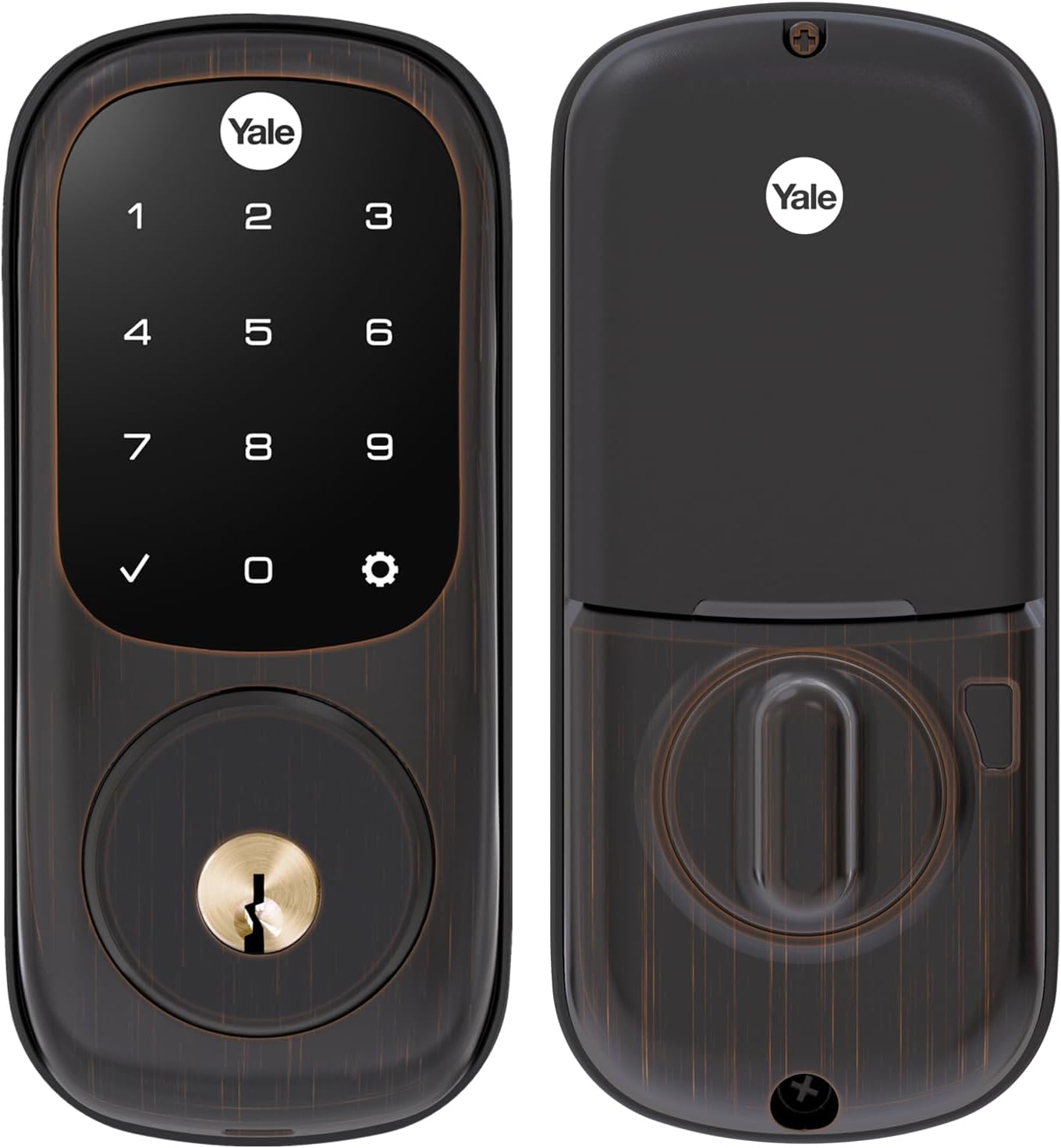
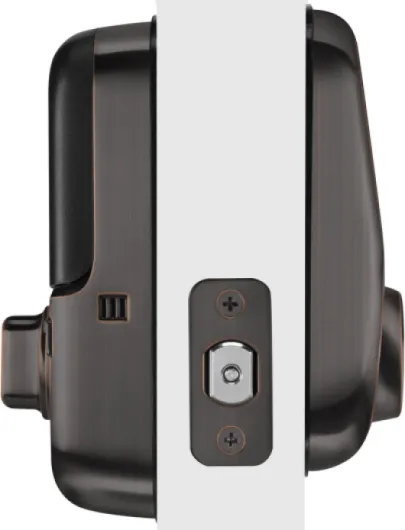
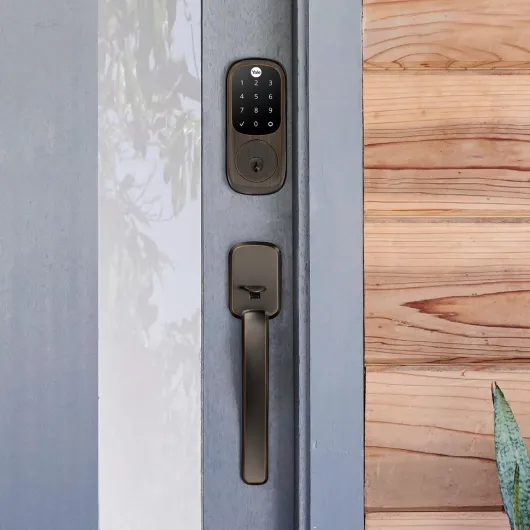
Visually, the lock is on the bulkier side but pretty standard for a smart deadbolt. The oil rubbed bronze finish looks decent in person. It’s not “luxury hardware store” level, but on my dark brown door it blends in well and doesn’t scream “cheap plastic gadget.” The outside unit is a smooth rectangular slab with the touchscreen on the top half and a keyhole on the bottom. Inside, you’ve got the usual chunky housing that holds the batteries and thumb turn.
The touchscreen itself is the main thing you interact with. It’s backlit and only lights up when you touch it, so the numbers aren’t visible all the time. To wake it up, you basically tap it with the back of your fingers or just press any part of the screen. Took me a couple of days to get used to that motion, but after that it’s muscle memory. The touch response is generally good: I haven’t had serious issues with missed presses unless my hands were really wet or freezing cold in winter, which is kind of expected.
One thing I noticed compared to some cheaper locks I tried: the beeps and voice prompts on this one are less obnoxious. You can have it guide you with spoken instructions during setup, which is handy the first time. After that, you can turn the volume down so your front door doesn’t sound like an ATM every time someone comes home late at night. The interior unit is still a bit large, so if you have a narrow window or trim near the door, measure first, but on a standard door it looks normal.
Overall, design-wise it’s functional rather than flashy. It looks fine, it doesn’t feel flimsy, and the touchscreen doesn’t look cheap. If you want something ultra-minimal or tiny, this isn’t it. If you just want a smart lock that looks like a normal modern deadbolt and doesn’t clash with bronze hardware, it gets the job done.
Battery life and what happens when power runs low
This lock runs on 4 AA batteries, which are included in the box. Battery life in my case has been reasonable. With daily use (roughly 5–8 lock/unlock cycles a day, plus some remote commands), I’m seeing around 8–10 months before needing a replacement. Some Amazon reviewers report similar results, and a few even better. Obviously, how well your door is aligned matters a lot: the more the motor has to fight the door, the faster the batteries drain.
The lock gives you low battery warnings with beeps and, depending on your hub, app notifications. SmartThings and Hubitat both warned me before the lock actually died, which is what you want. I changed the batteries as soon as I got the alert, so I haven’t pushed it to the point where it completely shut down. Still, I’d say don’t ignore the first low-battery warning, especially if you rely heavily on the keypad and rarely carry the physical key.
One thing to keep in mind: as batteries get low, the motor sound can change a bit, and you might notice it moving slightly slower. That’s your hint even before the official warning. The nice thing about this model is that it still has a regular key cylinder, and Yale includes two keys. I tested it by pulling the batteries out: the electronic part obviously dies, but the key works just like a regular deadbolt. So you’re not completely locked out unless you were careless enough to ignore warnings and never carry a key.
Overall, I’d call the battery situation good but not outstanding. It’s better than some Wi‑Fi locks I’ve used that needed fresh batteries every few months, but it’s not set-and-forget for multiple years either. Plan on changing batteries maybe once a year if your door is aligned well, and more often if your household is constantly in and out or if you hammer it with a lot of remote commands.
Build quality, long-term wear, and support issues
Build quality feels decent in the hand. The outside unit has some weight to it, and the latch mechanism doesn’t feel like thin junk metal. It’s rated as a Grade 2 deadbolt, which is better than the cheapest hardware-store stuff but not top-tier Grade 1. For a normal house, Grade 2 is usually fine, especially if you install the included strike plate properly with long screws that reach the actual frame, not just the trim. One of the Amazon reviewers made that point, and I agree: if your frame is weak, it doesn’t matter how strong the bolt is.
On my door, the oil rubbed bronze finish has held up fine so far. No weird peeling or major discoloration, though if your door gets hammered by direct sun and rain every day, I’d expect some fading over the years like any exterior hardware. Another user mentioned replacing an older Yale after 12 years because the finish dulled; that sounds realistic. If you want hardware that looks brand new forever, that’s wishful thinking at this price point.
The bigger question is electronics longevity. Most people seem happy for at least the first couple of years, but there are some pretty annoyed reviews about touchscreens failing just after the warranty period. One reviewer said their keypad died a little over a year in, and Yale support told them they needed a whole new unit and didn’t sell just the front panel. They got offered a 20% discount code, but the replacement was out of stock on Yale’s site. That’s not exactly confidence‑inspiring if you’re expecting this thing to last a decade without issues.
My honest take: the lock feels sturdy enough and should be fine for several years if not abused, but I wouldn’t assume it’s going to last forever. Electronics outdoors are always a bit of a gamble. For an item in this price range, I’d like a longer warranty or at least easier access to spare parts. If you’re paranoid about failures, it might be worth considering an extended warranty, especially if you’re putting three or four of these across your property like that one reviewer did.
Daily performance, Z‑Wave behavior, and keypad reliability
In day‑to‑day use, the lock is mostly boring in a good way: you punch in the code, it unlocks, the motor turns smoothly, and that’s it. On my door, alignment is decent, so the bolt slides in and out without grinding. When a smart lock struggles, it’s usually the door alignment, not the lock itself, and this one is no different. If your door sticks or the frame is warped, expect the motor to struggle or fail sometimes, no matter which brand you choose. I had to adjust my strike plate slightly to get consistent locking.
The Z‑Wave side has been decent with SmartThings and later Hubitat. Pairing took a couple of tries the first time; I had to bring the hub close to the door just like one of the Amazon reviewers mentioned. After pairing, it stayed connected fine once I moved the hub back. Remote lock/unlock from the app usually responds in a few seconds. It’s not instant like Bluetooth, but it’s reliable enough. Automations like “lock door when I arm away mode” work as expected.
Keypad performance is mostly solid. The screen wakes up quickly, and it accepts codes without drama as long as you type at a normal pace. There is a small quirk: you need to enter the PIN within about 5 seconds while the screen is active, or it cancels and you start again. You get used to it, but the first couple of days I found myself timing out when I was distracted. In the rain or cold, it still worked, though registering touches with gloves on is hit or miss, which is pretty normal for this kind of capacitive screen.
Where people run into trouble is often not the lock itself but the ecosystem. For example, Ring’s handling of schedules is limited, so even though the lock hardware supports user codes fine, you can’t enforce time windows the way you’d expect. That’s not really Yale’s fault, but as a buyer you feel it as a product limitation. So performance summary: hardware and keypad are pretty solid, Z‑Wave is stable once set up, but your experience will heavily depend on how good your chosen hub is with locks.
What this lock actually does (and what it doesn’t)
On paper, the Yale Assure Touchscreen with Z‑Wave is a keypad deadbolt with optional smart features. Out of the box, you get the lock, a Z‑Wave module already inside, two physical keys, 4 AA batteries, mounting hardware, and a paper template for drilling if needed. It replaces a standard deadbolt on doors around 1‑3/4" to 2‑1/4" thick, so basically most normal exterior doors. No extra holes in the door, just pull the old deadbolt, drop this in, line it up, and screw it together.
Without any hub, it works as a basic electronic lock: you can create PIN codes, use the touchscreen, and enable auto‑relock. That’s fine if all you want is keyless entry. But the whole reason to buy the Z‑Wave version is remote control and integration. Once you pair it with something like SmartThings, Ring Alarm, Abode, Vera, or Hubitat, you can:
- Lock/unlock from your phone
- Get notifications when someone opens the door
- See a basic access history (depends on your hub)
- Tie it into routines, like “lock when I arm the alarm”
Important detail: there is no dedicated Yale app for this model. Everything goes through your hub’s app. That’s good if you hate app clutter, but it also means you’re at the mercy of how good your hub’s support is. For example, some Ring users complain they can’t set proper schedules on codes through Ring, which is a real limitation if you rent out a room or want strict time windows for cleaners or contractors.
So in practice, I’d describe this as: a decent keypad lock on its own, and a flexible smart lock only if your chosen Z‑Wave system handles locks properly. If your hub is flaky or missing features, this lock can feel half‑baked, even though the hardware itself is fine. That’s the trade‑off with this kind of older Z‑Wave product.
Pros
- Reliable keypad operation and auto‑relock for everyday use
- Integrates well with many Z‑Wave hubs (SmartThings, Abode, Hubitat, etc.)
- Decent battery life and includes physical keys as backup
Cons
- Real capabilities depend heavily on your hub’s features (Ring is limited for scheduling)
- Some reports of touchscreen failures just after warranty with limited support options
Conclusion
Editor's rating
Overall, the Yale Touchscreen Deadbolt with Z‑Wave is a pretty solid smart lock for people who already live in the Z‑Wave world. The keypad works well, the motor action is smooth if your door is aligned, and battery life is reasonable. Being able to tie it into SmartThings, Abode, Hubitat, or Ring and lock/unlock from your phone is genuinely useful once you get used to it. For everyday stuff—kids coming home from school, letting in contractors, not fumbling with keys—it does the job without feeling like a gimmick.
It’s not perfect, though. Long‑term durability of the touchscreen is a question mark, and some users have had failures just outside the warranty window, with support that feels a bit stingy for the price. Also, the product leans heavily on your hub’s capabilities: if your system doesn’t handle schedules or access control well (like Ring in some cases), you’ll feel limited even though the hardware could probably do more. And if you don’t own a hub at all, you’re basically buying an overpriced keypad lock.
I’d recommend this to someone who: already has a compatible Z‑Wave hub, is comfortable pairing devices and tweaking settings, and wants a straightforward keypad lock that integrates with their alarm or routines. If you’re not techy, want a lock with its own polished app, or you’re picky about long warranties and flawless support, you might be happier with a newer Wi‑Fi model or a different ecosystem. In short: good, functional, not mind‑blowing—but it gets the job done for the right kind of user.